Table Properties
Table Properties
For all OpenL Tablets table types, except for Properties Table, Configuration Table and the Other type tables, that is, non-OpenL Tablets tables, properties can be defined as containing information about the table. A list of properties available in OpenL Tablets is predefined, and all values are expected to be of corresponding types. The exact list of available properties can vary between installations depending on OpenL Tablets configuration.
Table properties are displayed in the section which goes immediately after the table header and before other table contents. The properties section is optional and can be omitted in the table. The first cell in the properties row contains the properties keyword and is merged across all cells in column if more than one property is defined. The number of rows in the properties section is equal to the number of properties defined for the table. Each row in the properties section contains a pair of a property name and a property value in consecutive cells, that is, second and third columns.
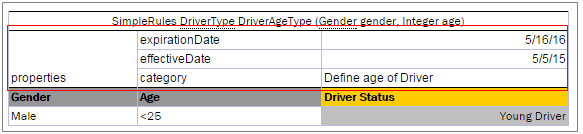
Table properties example
The following topics are included in this section:
- Category and Module Level Properties
- Default Value
- System Properties
- Properties for a Particular Table Type
- Rule Versioning
- Info Properties
- Dev Properties
- Properties Defined in the File Name
- Properties Defined in the Folder Name
- Keywords Usage in a File Name
Category and Module Level Properties
Table properties can be defined not only for each table separately, but for all tables in a specific category or a whole module. A separate Properties Table is designed to define this kind of properties. Only properties allowed to be inherited from the category or module level can be defined in this table. Some properties, such as description, can only be defined for a table.
Besides the Properties table, the module level properties can also be defined in a name of the Excel file corresponding to the module. For more information on defining properties in the Excel file name, see Properties Defined in the File Name.
Properties defined at the category or module level can be overridden in tables. The priority of property values is as follows:
- Table.
- Category.
- Module.
-
Default value.
Note: The OpenL Tablets engine allows changing property values via the application code when loading rules.