Appendix B: OpenAPI Project Generation Algorithm
Appendix B: OpenAPI Project Generation Algorithm
OpenAPI document describes all API endpoints, their parameters, request bodies, responses, and so on. Based on this
document, OpenL Tablets generates the corresponding spreadsheets and data type models. The result of generation is two
modules, Algorithms and Models, with Excel files inside. By default, both files are stored in the rules/ folder and
are discovered through the standard project layout, so rules.xml does not repeat their module declarations. These two
modules are always generated even if there are no rules or models in the project.
When the project is created from an uploaded OpenAPI file, the file is stored in the project root as openapi.json or
openapi.yaml, according to its format. The original file name is not retained. The generated rules.xml does not
contain an openapi block. The normalized file is discovered automatically and used in the default reconciliation
mode. OpenL Studio does not continue generating workbooks from it, so subsequent workbook edits are not overwritten.
The following topics are included:
- Generation Features
- Table Generation Details
- OpenAPI to OpenL Type Transformation
- Generated Annotation Template Class
Generation Features
OpenL Tablets generates exactly one corresponding data table, or spreadsheet table, or spreadsheet result for each path described in the Open API file.
The following topics are described in this section:
- Parameters
- Responses
- Request Body Model Decomposition
- Inheritance and Polymorphism Using OneOf, AllOf, and AnyOf
Parameters
The OpenAPI specification provides multiple places where properties for the endpoint can be located. These properties can be defined as path parameters, that is, a list of parameters applicable to all operations described under this path, or described for one of the operation parameters. OpenAPI project generation algorithm merges all these parameters and uses them as input parameters for a corresponding generated spreadsheet table.
Responses
The OpenAPI specification allows describing multiple operations for one path, such as GET, PATCH, or DELETE. An example is as follows.
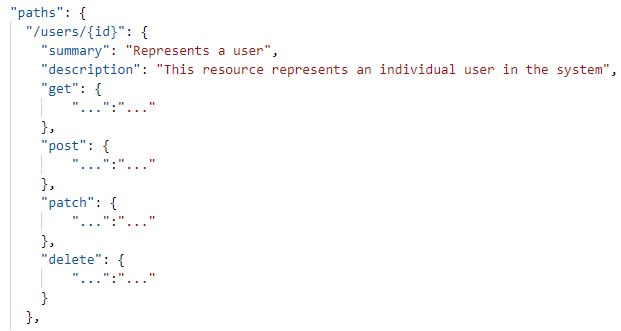
Example of the path with multiple operations
The OpenAPI format supports multiple HTTP codes, such as 200, 400, and 500, and different response media types, such as application/JSON, application/XML, and text/plain, and they all can be described for one path.
Just as for operations, only one HTTP code and media type can be used for spreadsheet generation. The algorithm selects API responses based on the HTTP codes definition as follows:
- If 200 is found, use it.
- If DEFAULT is found, use it.
- If no 200 or DEFAULT code status is found, the first found http code is used for table generation.
The priority of media types is as follows:
- Application/JSON
- Text/Plain
- If there is no such media type defined, the first found media type is used for generation process.
Important note: While for generation only one response code or media type can be processed, for filtration and spreadsheet results determination, all codes and media types are considered.
Request Body Model Decomposition
If the request body is used only once per all OpenAPI schema and it has more than one field, it is decomposed to its fields. If this schema is a child, parent, or a field of another schema, it is not expanded.
An example of the OpenAPI schema with decomposed request body is as follows.
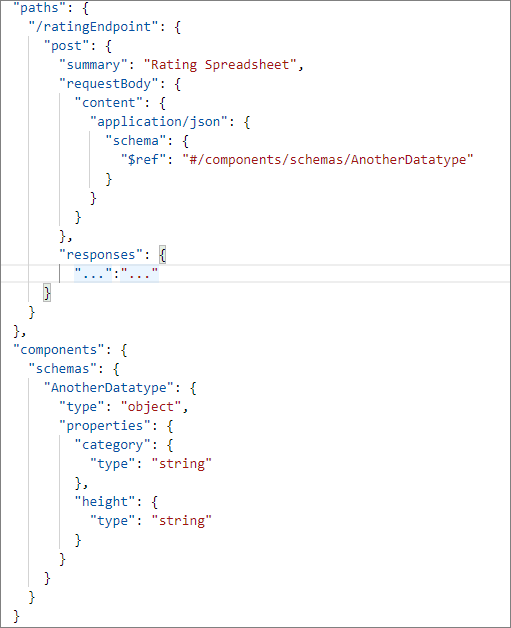
Request body schema to be decomposed
An example of request body decomposition result is as follows.
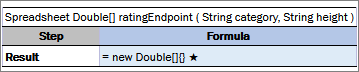
Generated spreadsheet with a decomposed schema in parameters
In this example, the AnotherDatatype schema is decomposed to its fields.
Inheritance and Polymorphism Using OneOf, AllOf, and AnyOf
The following keywords are responsible for the inheritance and polymorphism in the OpenAPI schema:
| Keyword | Description |
|---|---|
| AllOf | Used for model extending. The principle is the same as for nesting classes in Java. |
| OneOf, AnyOf | Reserved for future use. If a schema with these features is used, the corresponding schema is replaced by the Object type. |
An example of a schema with included nesting is as follows:
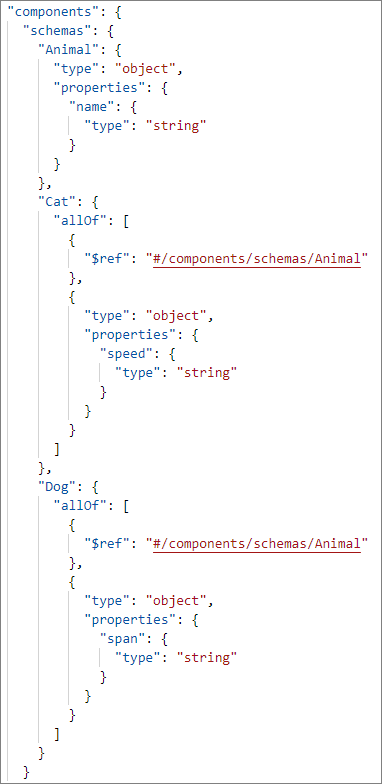
Example of nesting in the OpenAPI schema
An example of result is as follows.
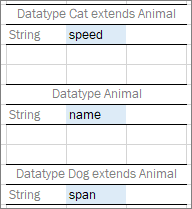
Example of generated datatypes
Table Generation Details
The OpenAPI project generation algorithm produces tables based on the OpenAPI path details. The following table types are available:
- spreadsheet table
- data table
- datatype table
The following topics are included in this section:
Decision Making
An OpenL Tablets project can be generated from any OpenAPI file. It is also possible to upload the OpenAPI schema generated by the OpenL Tablets Rule Services and thus upload the project with the following features:
-
project with enabled RuntimeContext
If any path in the OpenAPI document has an input parameter with a link to DefaultRulesRuntimeContext as #/components/schemas/DefaultRulesRuntimeContext, the generated project will contain the corresponding setting and RuntimeContext will be enabled.

The enabled option for providing runtime context
The DefaultRulesRuntimeContext input parameter is extracted from input parameters for generated spreadsheets. If any path contains RuntimeContext as a parameter, the generated project will have enabled runtime context. If there is any path without runtime context, the generated spreadsheet will be marked as non-OpenL Tablets rule, not included in the included methods regexp, and available only in the generated service AnnotationTemplate class.
An example of a schema with partially provided runtime context is as follows.
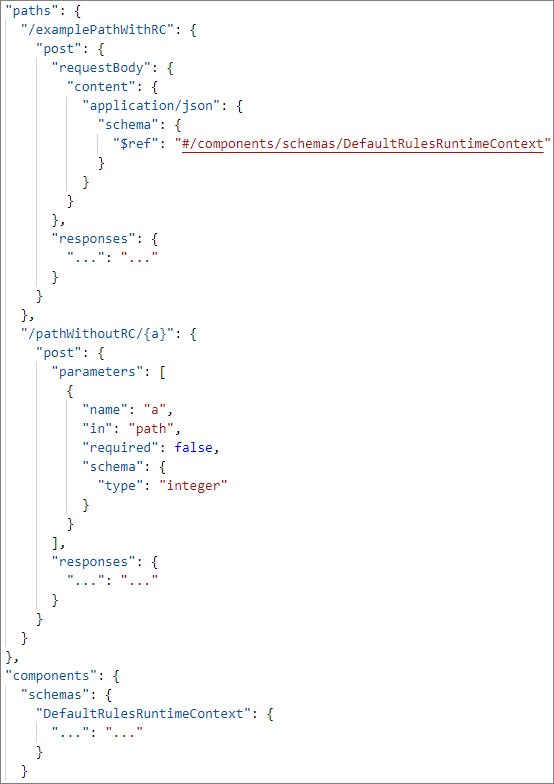
Example of partially provided runtime context
Based on this schema, the examplePathWithRC path with the POST operation is included in the exposed methods, but pathWithoutRC/{a} path is not included.
Data Table
The path is recognized as a data table model if the following conditions are met:
- The path starts with the “/get” prefix.
- The path returns an array of potential OpenL Tablets data types or simple types, such as String or Integer.
- No input parameters or operations are marked as “GET”.
- One input parameter DefaultRulesRuntimeContext and operation are marked as “POST”.
Spreadsheet Results
The path is converted to the spreadsheet result if the schema used in response is used only in responses through all the OpenAPI schema, and there is no reference from potential datatypes to this schema.
In addition, if there is a schema in the OpenAPI document that has a reference to a potential spreadsheet result type and this schema does not participate in datatypes, the schema is marked as a spreadsheet result.
An example of the schema with the spreadsheet result that is not returned by any path is as follows.
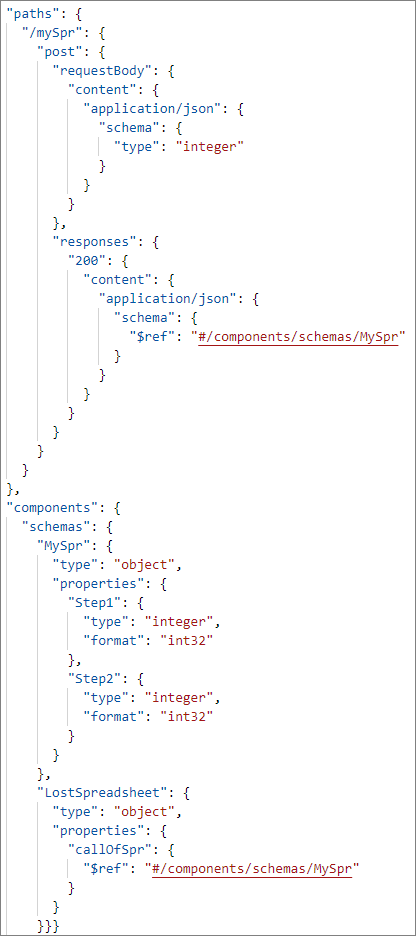
An example of a schema with two spreadsheet results
The result of generation is as follows.
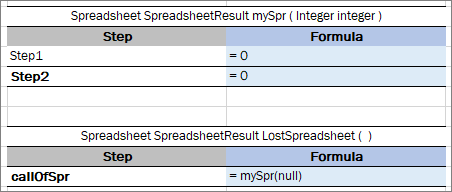
Lost spreadsheet generation result
The LostSpreadsheet is generated because it has a reference to the mySpr spreadsheet result, which is converted as a spreadsheet result call. Nevertheless, this LostSpreadsheet is not included in the Included Methods section not to break full validation of the project.

Module settings
Spreadsheet Tables and Datatypes
If a path response returns a primitive schema type or a schema participating in data tables or requests, the corresponding path is marked and generated as a spreadsheet, and the returning schema is generated as an OpenL Tablets data type.
Step Default Values
Spreadsheet tables and spreadsheet result table steps are presented by fields of the schema returned in the Response section of the OpenAPI path.
-
If a step is a primitive type, the default value for a corresponding type is set as a value of the step.
Default values are retrieved from the OpenAPI schema. If a default value is not present, the following values are set:
Type Default value in a cell Integer = 0 Long = 0L Double = 0.0 Float = 0.0f Boolean = false String = “” (empty string) Date = new Date() Object = new Object() - If a step is an OpenL Tablets datatype, a new instance creation is called.
- If a step is an OpenL spreadsheet call, it is called with default input parameters.
OpenAPI to OpenL Type Transformation
The following table describes correlation between types described in the OpenAPI schema and types that will be generated by OpenL Tablets.
| OpenAPI type (format) | OpenL generated type |
|---|---|
| Integer (int32) | Integer |
| Integer (int64) | Long |
| Integer(no format) | Integer |
| String | String |
| String (date/date-time) | Date |
| Number(float) | Float |
| Number (double) | Double |
| Number(no format) | Double |
| Boolean | Boolean |
Note: Parameters of the GET operation for the path are converted to primitive types, such as int, float, double, long, and Boolean. An example of such schema is described in the GET operation.
Generated Annotation Template Class
Names for generated datatypes, spreadsheet tables, and data tables are retrieved from the OpenAPI schema. There is no limitation for names in the OpenAPI specification. Names for spreadsheets and data types are generated from the path of the OpenAPI schema which can include path variables, such as path/{a}/{b}/{c} or /api/v1/example. Not all characters in the path are allowed in spreadsheet names because names of the OpenL Tablets rules, data tables, and data types must follow Java naming conventions.
The OpenL OpenAPI generation functionality can transform invalid table names into correct ones but in this case, the original paths are lost, and reconciliation is done with errors. To avoid this situation, in addition to the generated modules, OpenL Tablets generates an additional template class written using a Groovy script, which makes it easy to update.
Original paths are stored in the generated service interface and OpenL Rule Services will provide the endpoint with the same URL as in the original OpenAPI structure.
The annotation template class will be applied by OpenL Tablets Rule Services due to automatically generated property in the rules-deploy.xml available at Repository > Project > Rules Deploy Configuration.
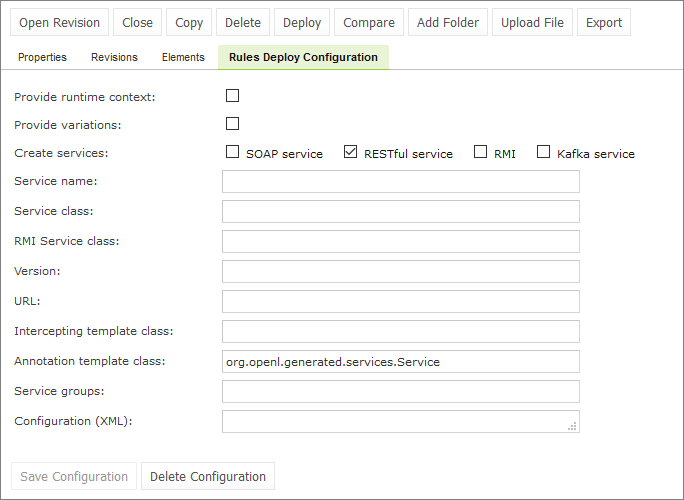
Example of project properties with annotation template class
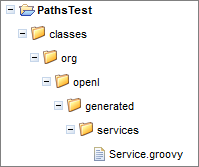
Example of the generated Groovy file location
By default, the script is saved to classes/org/openl/generated/services/Service.groovy and the script name reflects the same location.
An example of the OpenAPI JSON file with the annotation template class generated script is as follows.
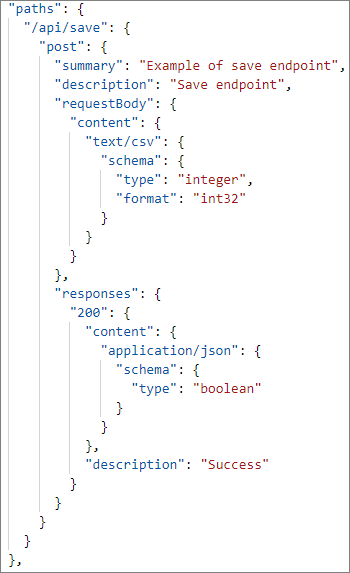
Path which requires script generation
In this example, the file contains the path name “/api/save” and the path itself contains illegal characters for a spreadsheet table name.
An example of the generated spreadsheet table is as follows.
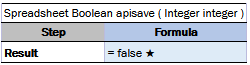
Example of the formatted path name
The api/save path is transformed to the apisave spreadsheet table name.
An example of the generated script is as follows.
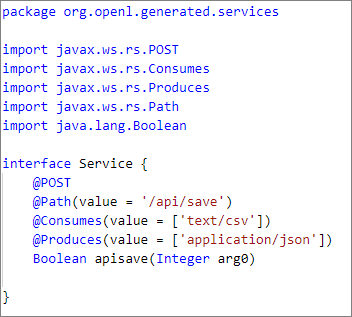
Example of the generated Groovy script
Original path is present in the generated service interface, and this service is presented by OpenL Tablets Rule Services. Endpoint will be available via the same path as for the original OpenAPI structure.