Project Structure
Project Structure
The best way to use the OpenL Tablets rule technology in a solution is to create an OpenL Tablets project in OpenL Studio. A typical OpenL Tablets project contains Excel files which are physical storage of rules and data in the form of tables. No Excel functionality, such as formulas and tab references, is used in OpenL Tablets. On the logical structure level, Excel files represent modules of the project where each Excel file is considered as one module.
When creating a project, the decision if and how to divide tables into one or many Excel files, or modules, is driven by the idea of how to present business logic in the most structural way. Generally, it depends on the project size. For a small project, all tables can fit in one file. For a bigger sized project, it is a good practice to divide tables per file according to their business purposes: datatype tables in one file, lookup tables in another file, decision tables and spreadsheet tables in the third file, and tests in the fourth file and so on. The number of files, or module, per project is unlimited.
Additionally, a project can contain rules.xml, Java classes, JAR files, Groovy scripts, according to developer’s needs, and other related documents, such as guides and instructions.
Thereby, the structure can be adjusted according to the developer’s preferences, for example, to comply with the Maven structure.
Note for experienced users: The rules.xml project file is a rules project descriptor that contains project and configuration details. For instance, a user may redefine a module name there that is the same as a name of the corresponding Excel file by default. When updating project details via OpenL Studio, the rules.xml file is automatically created or updated accordingly. All rules.xml tags are optional: if omitted, the project name defaults to the folder name, the modules to the rules/**/*.xlsx and tests/**/*.xlsx workbooks, and the classpath to groovy/ and lib/*.jar.
For more information on configuring rules.xml, see OpenL Tablets Developers Guide > Rules Project Descriptor.
The following topics are included in this section:
Multi Module Project
Projects with several rule modules are called multi module projects. All modules inside one project have mutual access to each other’s tables. It means that a rule or table of a module of a project is accessible and can be referenced and used from any rule of any module of the same project.
When there are many modules, OpenL Tablets engine may start processing modules from any of them. That is why it is important to specify the root file and compilation order of modules in a project. For this purpose, module dependencies are used.
To run a rule table from another project, connect projects by dependencies as described in Project, Module, and Rule Dependencies.
Creating a Project
The simplest way to create an OpenL Tablets project is to create a project from template in the installed OpenL Studio.
A new project is created containing simple template files that users can apply as the basis for a custom rule solution.
Project Sources
Project sources can be added from developer created artifacts, such as jars, Java classes, and Groovy scripts, which contain a reference to the folder with additional compiled classes to be imported by the module. For that, a rules project must contain the rules.xml file created in the project root folder.
Saved classpath is automatically added to the rules.xml file. After that, classpath can be used in rules. Classpath can indicate both specific jar and folder with libraries. The asterisk * symbol can be used for the varying part in the classpath.
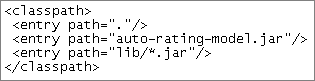
Classpath description in the rules.xml
To use a classpath in dependent projects, place a common classpath inside the main dependency project and then reuse it in all dependent projects.
Note: All sources defined for the project are loaded by the same source loader classloader. In other words, Java classes or Groovy scripts from one source can be used by classes or Groovy script from another source. Datatype classes or any other classes generated by rules are not visible in source loader classloader. In other words, any classes generated by rules are not visible in Java classes or Groovy script loaded by source loader classloader but can be loaded via Java reflection via the current thread classloader.