Rules Tables
A rules table is a regular decision table with vertical and optional horizontal conditions where the structure of the condition and return columns is explicitly declared by a user by starting column headers with the characters specific for each column as described in Decision Table Structure.
By default, each row of the decision table is a separate rule. Even if some cells of condition columns are merged, OpenL Tablets treats them as unmerged. This is the most common scenario.
Vertical conditions are marked with the Cn and MC1 characters. The MC1 column plays the role of the Rule column in a table. It determines the height of the result value list. An example is as follows.
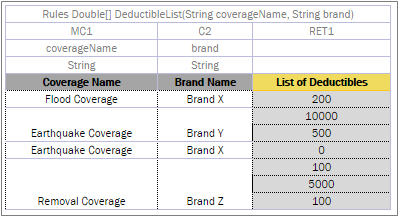
A Decision table with merged condition values
Earthquake Coverage for Brand Y and Brand X has a different list of values, so they are not merged although their first condition is the same.
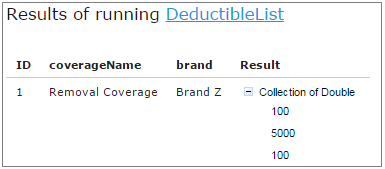
A list of values as a result
The horizontal conditions are marked as HC1, HC2 and so on. Every lookup matrix must start from the HC or RET column. The first HC or RET column must go after all vertical conditions, such as C, Rule, and comment columns. There can be no comment column in the horizontal conditions part. The RET section can be placed in any place of the lookup headers row. HC columns do not have the Titles section.
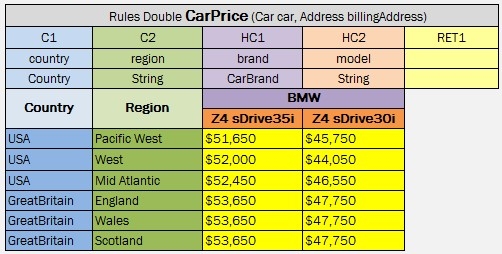
A lookup table example
The first cell of column titles must be merged on all rows that contain horizontal condition values. The height of the titles row is determined by the first cell in the row. For example, see the Country cell in the previous example.
To use multiple column parameters for a condition, return, or action, merge the column header and expression cells. Use this approach if a condition cannot be presented as a simple AND combination of one-parameter conditions.
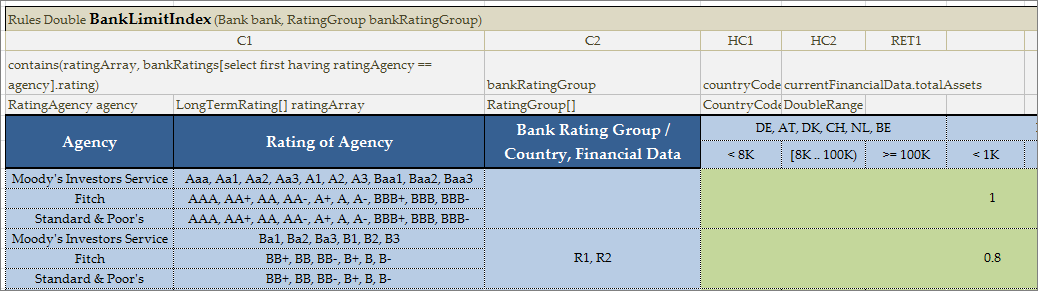
Example of the merged column header and expression cells
Any type of decision tables described previously, that is, Simple Rules, Smart Rules, Simple Lookup, and Smart Lookup, can be transformed into a Rules table with a detailed condition and return column declaration. Rules table is the most generic but least frequently used table type because other table types have simplified syntax and inbuilt logic satisfying specific business needs in a more user-friendly way.
Colors identify how values are related to conditions. The same table represented as a decision table is as follows:
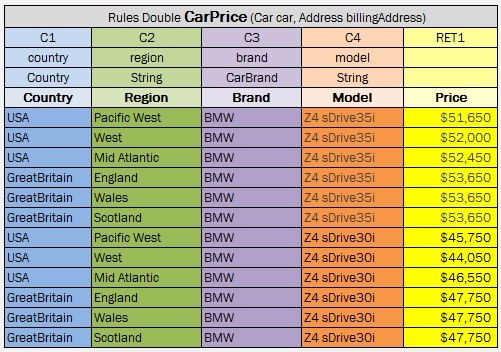
Lookup table representation as a decision table