Defining Dependencies between Modules in the Configuration Table
Often several or even all modules in the project have the same symbols in the beginning of their name. In such case, there are several options how to list several dependency modules in the Environment table:
- adding each dependency module by its name
- adding a link to all dependency modules using the common part of their names and the asterisk * symbol for the varying part
- adding a link to several dependency modules using the question mark ? symbol to replace one symbol anywhere in the name
All modules that have any letter or number at the position of the question mark symbol will be added as dependency.
The second option, that is, using the asterisk symbol after the common part of names, is considered a good practice because of the following reasons:
- Any new version of dependency module is not omitted in future and requires no changes to the configuration table.
- The configuration table looks simpler.
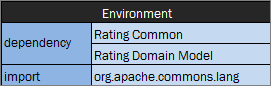
Configuration table with dependency modules added by their name
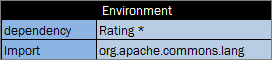
Configuration table with link to all dependency modules
Note: When using the asterisk * symbol, if the name of the module where dependency is defined matches the pattern, this module is automatically excluded from dependent modules to avoid circular dependencies.
The following example illustrates how displaying dependency modules in the configuration table impacts resulting values calculation. The following modules are defined in the project for an auto insurance policy:
Auto-Rating Algorithm.xlsxAuto-Rating-Domain Model.xlsxAuto-Rating-FL-01012016.xlsxAuto-Rating-OK-01012016.xlsxAuto-Rating Test Data.xlsx
The purpose of this project is to calculate the Vehicle premium. The main algorithm is located in the Auto-Rating Algorithm.xlsx Excel file.
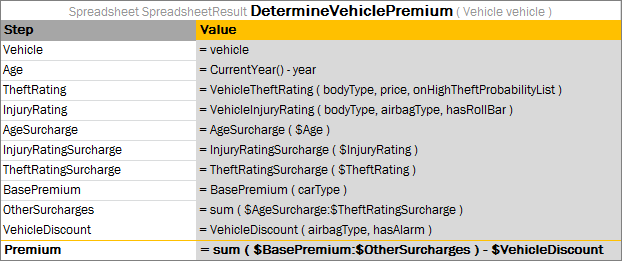
Rule with the algorithm to calculate the Vehicle premium
This file also contains the configuration table with the following dependency modules:
| Module | Description |
|---|---|
Auto-Rating-Domain Model.xlsx |
Contains the domain model. |
Auto-Rating-FL-01012016.xlsx |
Contains rules with the FL state specific values used in the premium calculation. |
Auto-Rating-OK-01012016.xlsx |
Contains rules with the OK state specific values. |
All these modules have a common part at the beginning of the name, Auto-Rating-.
The configuration table can be defined with a link to all these modules as follows:

Configuration table in the Auto-Rating Algorithm.xlsx file
Note: The dash symbol - added to the dependency modules names in a common part helps to prevent inclusion of dependency on Auto-Rating Algorithm itself.