Configuring Initial Users
The Initial Users section is displayed for all modes except Single-User. It defines the administrator account and the default group applied to all users.
| Field | Description |
|---|---|
| Administrators | Comma-separated list of usernames that are granted administrator privileges in OpenL Studio. These users always have administrator access, which cannot be revoked from the administration UI. |
| Default Group | Group automatically assigned to every user in the system, including users with no explicit group assignments. Select None to disable automatic default access. |
The Default Group acts as a permission baseline automatically applied to every user, including users with no explicit group or role assignments. All users inherit its permissions regardless of their individual access configuration.
To configure the Default Group, proceed as follows:
- In the navigation menu, click Security and scroll down to the Initial Users section.
- In the Default Group field, select a group from the list, or select None to disable automatic default access for all users.
- Click Apply to apply the changes.
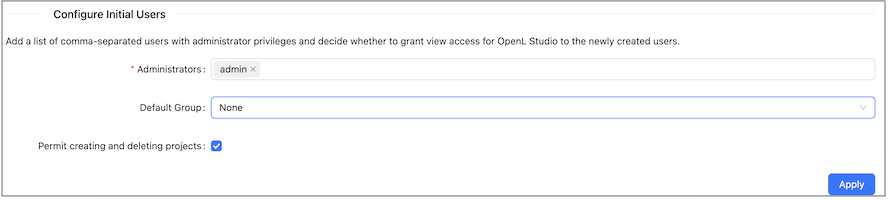
Default Group configuration in the Security tab
Note: The Default Group setting is not available in Single-User mode.
The Permit creating and deleting projects check box (security.allow-project-create-delete) controls whether users are allowed to create new projects or delete existing ones from design repositories. This setting is enabled by default and applies globally to all users regardless of their assigned role.
When this option is disabled:
- No user can create a new project in any design repository.
- No user can delete an existing project from a design repository.
- Existing projects remain fully editable subject to the user’s role.
The setting does not grant any permissions on its own — when enabled, users still need the Create or Delete permission on the target repository or project to perform the action. For more information on roles, see Understanding Roles.
The Allow Managers to bypass protected branches check box (security.allow-bypass-protected-branches) controls whether users with the Manager role can merge changes directly into protected branches from the OpenL Studio UI. When this option is disabled, protected branch restrictions apply uniformly to all users, and merges into protected branches must be completed using external Git tooling. When enabled, the bypass follows the scope of the assigned Manager role:
- If the Manager role is granted at the project level, the bypass applies to that project only.
- If the Manager role is granted at the repository level, the bypass applies to all projects in the repository.
For more information on protected branches, see Using Protected Branches. For more information on roles, see Understanding Roles.
Note: The Manager role also grants permission to manage access rights for other users and groups on the resource. It is not currently possible to grant merge-bypass authority without also granting role management rights.