BEX Language Overview
BEX Language Overview
Introduction to BEX
BEX language provides a flexible combination of grammar and semantics by extending the existing Java grammar and semantics presented in the org.openl.j configuration using new grammar and semantic concepts. It enables users to write expressions similar to natural human language.
BEX does not require any special mapping; the existing Java business object model automatically becomes the basis for open business vocabulary used by BEX. For example, the policy.effectiveDate Java expression is equivalent to the Effective Date of the Policy BEX expression.
If the Java model correctly reflects business vocabulary, no further action is required. Otherwise, custom type-safe mapping or renaming can be applied.
Keywords
The following table represents BEX keyword equivalents to Java expressions:
| Java expression | BEX equivalents |
|---|---|
== |
equals to is same as |
!= |
does not equal to is different from |
a.b |
b of the a |
< |
is less than |
> |
is more than |
<= |
is less or equal is in |
!> |
is no more than |
>= |
is more or equal |
!< |
is no less than |
Because of these keywords, name clashes with business vocabulary can occur. The easiest way to avoid clashes is to use upper case notation when referring to model attributes because BEX grammar is case sensitive and all keywords are in lower case.
For example, assume there is an attribute called isLessThanCoverageLimit. If it is referred to as is less than coverage limit, a name clash with keywords is less than occurs. The workaround is to refer to the attribute as Is Less Than Coverage Limit.
Simplifying Expressions
Unfortunately, the more complex an expression is, the less comprehensible the natural language expression becomes in BEX. For this purpose, BEX provides the following methods for simplifying expressions:
Notation of Explanatory Variables
BEX supports a notation where an expression is written using simple variables followed by the attributes they represent. For example, assume that the following expression is used in Java:
(Agreed Value of the vehicle - Market Value of the vehicle) / Market Value of the vehicle is more than Limit Defined By User
The expression is hard to read. However, it becomes much simpler if written according to the notion of explanatory variables as follows:
(A - M) / M > X, where
  A - Agreed Value of the vehicle,
  M - Market Value of the vehicle,
  X - Limit Defined By User
This syntax resembles the one used in scientific publications and is much easier to read for complex expressions. It provides a good mix of mathematical clarity and business readability.
Uniqueness of Scope
BEX provides another way for simplifying expressions using the concept of unique scope. For example, if there is only one policy in the scope of expression, a user can write effective date instead of effective date of the policy. BEX automatically determines uniqueness of the attribute and either produces a correct path or emits an error message in case of ambiguous statement. The level of the resolution can be modified programmatically and by default equals 1.
Operators Used in OpenL Tablets
The full list of OpenL Tablets operators in order of priority is as follows:
| Operator | Description |
|---|---|
| = | Simple assignment operator. C = A + B will assign value of A + B into C. Chaining the assignment operator is possible to assign a single value to multiple variables: C = A = B. |
| += | Add and assignment operator. It adds right operand to the left operand and assigns the result to left operand. C += A is equivalent to C = C + A. |
| -= | Subtract and assignment operator. It subtracts the right operand from the left operand and assigns the result to left operand. C -= A is equivalent to C = C – A. |
| *= | Multiply and assignment operator. It multiplies the right operand with the left operand and assigns the result to left operand. C *= A is equivalent to C = C * A. |
| /= | Divide and assignment operator. It divides the left operand with the right operand and assigns the result to left operand. C /= A is equivalent to C = C / A. |
| %= | Deprecated. Use mod(x, y) math function instead. Remainder and assignment operator. It divides and takes the remainder using two operands and assigns the result to left operand. C %= A is equivalent to C = C % A. |
| Conditional operator | |
? : ` condition ? valueIfTrue : valueIfFalse | Conditional, or ternary, operator that takes three operands and is used as shortcut for if-then-else statement. <br/>If condition is true, the operator returns the value of the valueIfTrue expression; <br/>otherwise, it returns the value of valueIfFalse`. |
|
| Boolean OR | |
| || or “or” | Logical OR operator. If any of the two operands are true, the condition becomes true. |
| Boolean AND | |
| && or “and” | Logical AND operator. If both the operands are true, the condition becomes true. |
| Equality | |
| == | Equality operator checks if the values of two operands are equal. |
| != or <> | Inequality operator checks if the values of two operands are equal. If values are not equal, the condition becomes true. |
| ==== | Strict equality operator checks if the values of two operands are equal without considering inaccuracy of float point values. If values are equal strictly, the condition becomes true. |
| !=== | Strict inequality operator checks if the values of two operands are equal regardless of inaccuracy of float point values. If values are not equal strictly, the condition becomes true. |
| string== | String equality operator checks whether values of two operands are equal. First, letter parts are compared, and if they are equal, numeric parts are compared, as if these are numbers, and not text. |
| string<> or string!= | String inequality operator checks if the values of two operands are equal. If the values are not equal, the condition becomes true. First, letter parts are compared, and if they are equal, numeric parts are compared, as if these are numbers, and not text. |
| Relational | |
| < | Less than operator checks if the value of the left operand is less than the value of the right operand. |
| > | Greater than operator checks if the value of the left operand is greater than the value of right operand. |
| <= | Less than or equal to operator checks if the value of left operand is less than or equal to the value of right operand. |
| >= | Greater than or equal to operator checks if the value of the left operand is greater than or equal to the value of right operand. |
| <== | Strict less than operator checks if the value of the left operand is less than the value of right operand without considering inaccuracy of float point values. |
| >== | Strict greater than operator checks if the value of the left operand is greater than the value of right operand without considering inaccuracy of float point values. |
| <=== | Strict less than or equal to operator checks if the value of the left operand is less than or equal to the value of right operand without considering inaccuracy of float point values. |
| >=== | Strict greater than or equal to operator checks if the value of the left operand is greater than or equal to the value of right operand without considering inaccuracy of float point values. |
| string< | String less than operator checks if the value of the left operand is less than the value of the right operand. First, letter parts are compared, and if they are equal, numeric parts are compared, as if these are numbers, and not text. |
| string> | String greater than operator checks if the value of the left operand is greater than the value of right operand. First, letter parts are compared, and if they are equal, numeric parts are compared, as if these are numbers, and not text. |
| string<= | String less than or equal to operator checks if the value of left operand is less than or equal to the value of right operand. First, letter parts are compared, and if they are equal, numeric parts are compared, as if these are numbers, and not text. |
| string>= | String greater than or equal to operator checks if the value of the left operand is greater than or equal to the value of right operand. First, letter parts are compared, and if they are equal, numeric parts are compared, as if these are numbers, and not text. |
| Additive | |
| + | Addition operator adds values on either side of the operator. |
| - | Subtraction operator subtracts right-hand operand from left-hand operand. |
| Multiplicative | |
| * | Multiplication operator multiplies values on either side of the operator. |
| / | Division operator divides left-hand operand by right-hand operand. |
| % | Deprecated. Use mod(x, y) math function instead. Remainder operator divides left-hand operand by right-hand operand and returns remainder. |
| Power | |
| ** | Deprecated. Use pow(x, y) math function instead. Exponentiation operator returns the result of raising left-hand operand to the power right-hand operand. |
| Unary | |
| + | Unary plus operator precedes its operand and indicates positive value. |
| - | Unary negation operator precedes its operand and negates it. |
| ++ | Deprecated. Use x = x + 1 expression instead. Increment operator increments its operand (increases the value of operand by 1) and returns a value. If a postfix with an operator is used after an operand (for example, x++), it returns the value before incrementing. For instance, x = 3; y = x++; gives y = 3, x = 4. If a prefix with operator is used before an operand (for example, ++x), it returns the value after incrementing. For instance, x = 3; y = ++x; gives y = 4, x = 4. |
| – | Deprecated. Use x = x – 1 expression instead. Decrement operator decrements its operand (decreases the value of operand by 1) and returns a value. If a postfix with an operator is used after an operand (for example, x–), it returns the value before decrementing. For instance, x = 3; y = x–; gives y = 3, x = 2. If a prefix with an operator is used before an operand (for example, ++x), it returns the value after decrementing. For instance, x = 3; y = –x; gives y = 2, x = 2. |
| ! or not | Logical NOT operator reverses the logical state of its operand. If a condition is true, then Logical NOT operator will make it false. |
| (Datatype) x | Cast operator converts the operand value x to the specified Datatype type. |
When comparing elements of different types, such as an array and an element of the array, or different datatypes, or string and integer, a warning message is displayed. An example is as follows:
Warning: Compared elements have different types ('java.lang.String[]', 'java.lang.String'). Comparing these types always returns true. banks.bankRatings[select all having rating == "A"]
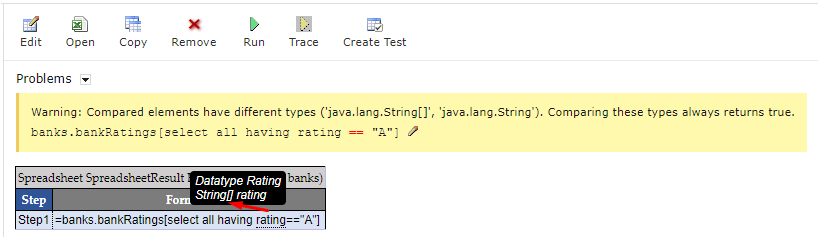
Suppose you’re working with a list of bank ratings stored in an array and you want to select banks ratings with a value of “A”. If you mistakenly compare the whole array to the single string “A”, this warning can appear, indicating a mismatch in the types being compared.
Comparing elements of different types
To resolve this warning, use elements of the same type for comparison. To compare an array to an element of the array, use the flatten function.
