Testing Spreadsheet Result
Cells of a spreadsheet result, which is returned by the rule table, can be tested as displayed in the following spreadsheet table.
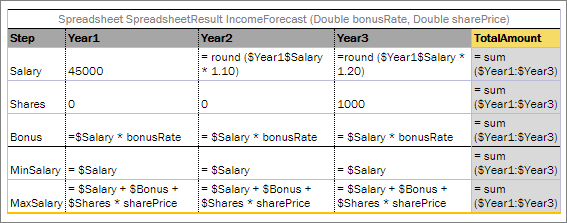
A sample spreadsheet table
Simplified syntax is used to pull results from a spreadsheet table if a spreadsheet table contains only one column besides the row name column: _res_.$<row name>.
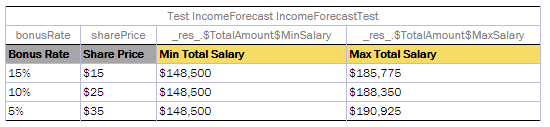
Test for the sample spreadsheet table
Columns marked with the grey color determine income values, and columns marked with yellow determine the expected values for a specific number of cells. It is possible to test as many cells as needed.
The result of running this test in OpenL Studio is provided in the following output table.
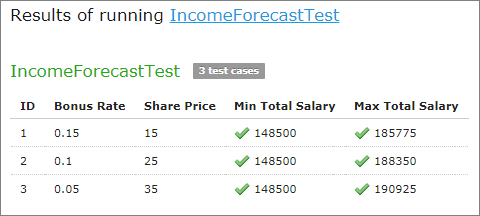
The sample spreadsheet test results
It is possible to test cells of the resulting spreadsheet which contain values of complex types, such as:
- array of values
- custom data type with several attributes
- other spreadsheets nested in the current one
For this purpose, the same syntax described in Specifying Data for Aggregated Objects can be used. It also includes simplified options.
_res_.$<column name>$<row name>[i]
_res_.$<column name>$<row name>.<attribute name>
_res_.$<column of Main Spreadsheet>$<row of Main Spreadsheet>.$<column of Nested Spreadsheet>$<row of Nested Spreadsheet>
_res_.$<column of Main Spreadsheet>$<row of Main Spreadsheet>[i].$<column of Nested Spreadsheet>$<row of Nested Spreadsheet>
where i – sequence number of an element, starts from 0.
Consider an advanced example provided in the following figure. The PolicyCalculation spreadsheet table performs lots of calculations regarding an insurance policy, including specific calculations for vehicles and a main driver of the policy. In order to evaluate vehicle and drivers, for example, calculate their score and premium, the VehicleCalculation and DriverCalculation spreadsheet tables are invoked in cells of the PolicyCalculation rule table.
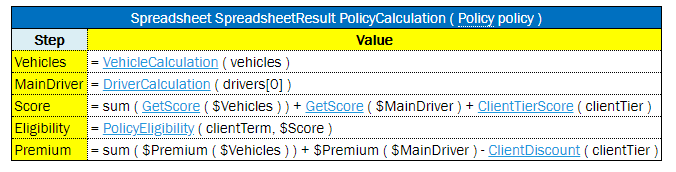
Example of the PolicyCalculation spreadsheet table
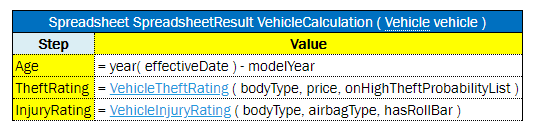
Example of the VehicleCalculation spreadsheet table

The advanced sample spreadsheet table
The structure of the resulting PolicyCalculation spreadsheet is rather complex. Any cell of the result can be tested as illustrated in the PolicyCalculationTest test table.
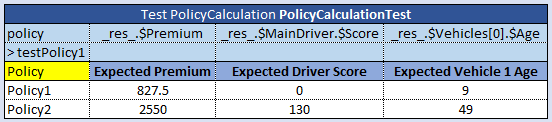
Test for the advanced sample spreadsheet table
To test a spreadsheet that returns a single value, use the same logic as for decision tables.