Working with Data Types
Working with Data Types
Data in OpenL Tablets must have a type of data defined. A data type indicates the meaning of the data, their possible values, and instructs OpenL Tablets how to process operations, which rules can be performed, and how these rules and operations affect data.
All data types used in OpenL Tablets can be divided into the following groups:
| Type | Description |
|---|---|
| Predefined data types | Types that exist in OpenL Tablets, can be used, but cannot be modified. |
| Custom data types and vocabularies | Types created by a user as described in the Datatype Table section. |
This section describes predefined data types that include the following ones:
Simple Data Types
The following table lists simple data types that can be used in user’s business rules in OpenL Tablets:
| Data type | Description | Examples | Usage in OpenL Tablets |
|---|---|---|---|
| Integer | Used to work with whole numbers without fraction points. The maximum Integer value is 2147483647. |
8; 45; 12; 356; 2011 | Common for representing a variety of numbers, such as driver’s age, a year, a number of points, and mileage. |
| Double | Used for operations with fractional numbers. Can hold very large or very small numbers. |
8.4; 10.5; 12.8; 12,000.00; 44.416666666666664 |
Commonly used for calculating balances or discount values for representing exchange rates, a monthly income, and so on. In other words, the dollar or any other currency value that does not require very high precision must be of a Double data type. A good practice is to explicitly round Double values to a business significative number of decimals after calculation, at least in end results. |
| String | Represents text rather than numbers. String values are comprised of a set of characters that can contain spaces and numbers. For example, the word Chrysler and the phrase The Chrysler factory warranty is valid for 3 years are both Strings. |
John Smith, London, Alaska, BMW; Driver is too young. |
Represents cities, states, people names, car models, genders, marital statuses, as well as messages, such as warnings, reasons, notes, diagnosis, and other similar data. |
| Boolean | Represents only two possible values: true and false. For example, if a driver is trained, the condition is true, and the insurance premium coefficient is 1.5. If the driver is not trained, the condition is false, and the coefficient is 0.25. |
true; yes; y; false; no; n | Handles conditions in OpenL Tablets. The synonym for ‘true’ is ‘yes’, ‘y’; for ‘false’ – ‘no’, ‘n’. |
| Date | Used to operate with dates. | 06/05/2010; 01/22/2014; 11/07/95; 1/1/1991. |
Represents any dates, such as policy effective date, date of birth, and report date. If the date is defined as a text cell value, it is expected in the <month>/<date>/<year> format. |
Byte, Character, Short, Long, Float, BigInteger, and BigDecimal data types are rarely used in OpenL Tablets, therefore, ranges of values are only provided in the following table. For more information about values, see the appropriate Java documentation.
| Data type | Min | Max |
|---|---|---|
| Byte | -128 | 127 |
| Character | 0 | 65535 |
| Short | -32768 | 32767 |
| Long | -9223372036854775808 | 9223372036854775807 |
| Float | 1.5*10-45 | 3.481038 |
There is no range limits for BigInteger and BigDecimal. Using these values can cause performance issues and thus must be avoided.
Range Data Types
Range Data Types can be used when a business rule must be applied to a group of values. For example, a driver’s insurance premium coefficient is usually the same for all drivers from within a particular age group. In such situation, a range of ages can be defined, and one rule for all drivers from within that range can be created. The way to inform OpenL Tablets that the rule must be applied to a group of drivers is to declare driver’s age as the range data type.
OpenL Tablets supports the following range data types:
| Type | Description |
|---|---|
| IntRange | Intended for processing whole numbers within an interval, for example, vehicle or driver age for calculation of insurance compensations, or years of service when calculating the annual bonus. Range borders are stored as Long values. |
| DoubleRange | Used for operations on fractional numbers within a certain interval. For instance, annual percentage rate in banks depends on amount of deposit which is expressed as intervals: 500 – 9,999.99; 10,000 – 24,999.99. |
| CharRange | Used for processing character values within a predefined interval. |
| DateRange | Used for processing dates within a predefined interval. Only default date format, such as 01/01/1999 or 01/01/1999 12:12:12, is supported. |
| StringRange | Used for processing string values within a predefined interval. If a string contains numbers, they are treated in a regular way. For example, for a string range [A1…A3], A2 is within the range, and A22 is out of the range. StringRange conditions can be defined in smart rules and smart lookups, while in simple rules and simple lookups it is interpreted as String. |
The following illustration provides a very simple example of how to use a range data type. The value of discount percentage depends on the number of orders and is the same for 4 to 5 orders and 7 to 8 orders. A number of cars per order is defined as IntRange data type. For a number of orders from, for example, 6 to 8, the rule for calculating the discount percentage is the same: the discount percentage is 10.00% for BMW, 4.00% for Porsche, and 6.00% for Audi.
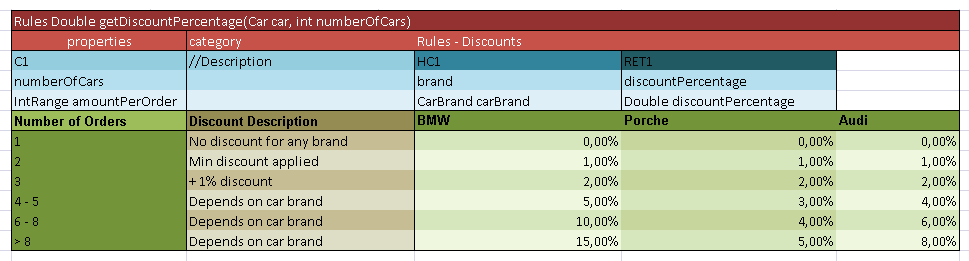
Usage of the range data type
Supported range formats are as follows:
| # | Format | Interval | Example | Values for IntRange |
|---|---|---|---|---|
| 1 | [<min_number>; <max_number>) Mathematic definition for ranges using square brackets for included borders and round brackets for excluded borders. |
[min; max] (min; max) [min; max) (min; max] |
[1; 4] (1; 4) [1; 4) (1; 4] |
1, 2, 3, 4 2, 3 1, 2, 3 2, 3, 4 |
| 2 | [<min_number> .. <max_number>) Mathematic definition for ranges with two dots used instead of semicolon. |
[min; max] (min; max) [min; max) (min; max] |
[1 .. 4] (1 .. 4) [1 .. 4) (1 .. 4] |
1, 2, 3, 4 2, 3 1, 2, 3 2, 3, 4 |
| 3 | [<min_number> - <max_number>) Mathematic definition for ranges with a hyphen used instead of a semicolon. |
[min - max] (min - max) [min - max) (min - max] |
[1 - 4] (1 - 4) [1 - 4) (1 - 4] |
1, 2, 3, 4 2, 3 1, 2, 3 2, 3, 4 |
| 4 | <min_number> – <max_number> |
[min; max] |
1 - 4 -2 - 2 -4 - -2 |
[1; 4] [-2; 2] [-4; -2] |
| 5 | <min_number> .. <max_number> |
[min; max] |
1 .. 4 |
1, 2, 3, 4 |
| 6 | <min_number> … <max_number> |
(min; max) |
1 … 4 |
2, 3 |
| 7 | <<max_number> |
[-∞; max) |
<2 |
-∞ …, -1, 0, 1 |
| 8 | <=<max_number> |
[-∞; max] |
<=2 |
-∞ …, -1, 0, 1, 2 |
| 9 | ><min_number> |
(min; +∞] |
>2 |
3, 4, 5, … +∞ |
| 10 | >=<min_number> |
[min; +∞] |
>=2 |
2, 3, 4, 5, … +∞ |
| 11 | ><min_number> <<max_number> <<max_number> ><min_number> |
(min; max) |
>1 <4 <4 >1 |
2, 3 2, 3 |
| 12 | >=<min_number> <<max_number> <<max_number> >=<min_number> |
[min; max) |
>=1 <4 <4 >=1 |
1, 2, 3 1, 2, 3 |
| 13 | ><min_number> <=<max_number> <=<max_number> ><min_number> |
(min; max] |
>1 <=4 <=4 >1 |
2, 3, 4 2, 3, 4 |
| 14 | >=<min_number> <=<max_number> <=<max_number> >=<min_number> |
[min; max] |
>=1 <=4 <=4 >=1 |
1, 2, 3, 4 1, 2, 3, 4 |
| 15 | <min_number>+ |
[min; +∞] |
2+ |
2, 3, 4, 5, … +∞ |
| 16 | <min_number> and more |
[min; +∞] |
2 and more |
2, 3, 4, 5, … +∞ |
| 17 | more than <min_number> |
(min; +∞] |
more than 2 |
3, 4, 5, … +∞ |
| 18 | less than <max_number> |
[-∞; max) |
less than 2 |
-∞ …, -1, 0, 1 |
The following rules apply:
- Infinities in IntRange are represented as
Integer.MIN_VALUEfor -∞and Integer.MAX_VALUEfor +∞. - Using of “..” and “…” requires spaces between numbers and dots.
- Numbers can be enhanced with the
$sign as a prefix andK,M,Bas a postfix, for example,$1K = 1000. - For negative values, use the ‘
-’ (minus) sign before the number, for example,-<number>.
Void Data Type
Void is a special type that represents the absence of a value or lack of a specific type. It is often used as a return type for functions that do not return a value or as a placeholder for empty parameters in function declarations. Essentially, void signifies that there is no data or value associated with it.
In rules, use the void type when a rule must be executed but no value is expected to be returned.