Working with Functions
Working with Functions
Data types are used to represent user data in the system. Business logic in rules is implemented using functions. Examples of functions are the Sum function used to calculate a sum of values and Min/Max functions used to find the minimum or maximum values in a set of values.
This section describes OpenL Tablets functions and provides simple usage examples. All functions can be divided into the following groups:
- math functions
- array processing functions
- date functions
- String functions
- error handling functions
The following topics are included in this section:
- Understanding OpenL Tablets Function Syntax
- Understanding Math Functions
- Understanding Date Functions
- Understanding Special Functions and Operators
- Null Elements Usage in Calculations
Understanding OpenL Tablets Function Syntax
This section briefly describes how functions work in OpenL Tablets.
Any function is represented by the following elements:
- function name or identifier, such as sum, sort, median
- function parameters
- value or values that the function returns
For example, in the max(value1, value2) expression, max is the rule or function name, (value1, value2) are function parameters, that is, values that take part in the action. When determining value1 and value2 as 50 and 41, the given function looks as max(50, 41) and returns 50 in result as the biggest number in the couple.
If an action is performed in a rule, use the corresponding function in the rules table. For example, to calculate the best result for a gamer in the following example, use the max function and enter max(score1, score2, score3) in the C1 column. This expression instructs OpenL Tablets to select the maximum value in the set. The contains function can be used to determine the gamer level.
Subsequent sections provide description for most commonly used OpenL Tablets functions. For a full list of functions, see Math Functions, Array Functions, Date Functions, String Functions, and Special Functions.
Understanding Math Functions
Math functions serve for performing math operations on numeric data. These functions support all numeric data types described in Working with Data Types.
The following example illustrates how to use functions in OpenL Tablets. The rule in the diagram defines a gamer level depending on the best result in three attempts.

An example of using the ‘max’ function
The following topics are included in this section:
Math Functions Used in OpenL Tablets
The following table lists math functions used in OpenL Tablets:
| Function | Description |
|---|---|
| min/max | Returns the smallest or biggest element in a set of elements of comparable type for an array or multiple values. The result type depends on the entry type. min/max(element1, element2, …), min/max(array[]). For example, if Date1 = 01/02/2009 and Date2 = 03/06/2008 are Date variables, max(Date1, Date2) returns 01/02/2009. |
| sum | Adds all numbers in the provided array and returns the result as a number. sum(number1, number2, …), sum(array[]). |
| avg | Returns the arithmetic average of array elements. The function result is a floating value. avg(number1, number2, …), avg(array[]). |
| product | Multiplies numbers from the provided array and returns the product as a number. product(number1, number2, …), product(array[]). |
| quotient | Truncated integer quotient (Excel-style QUOTIENT). Discards the fractional part, rounding toward zero. quotient(a, b). See Division and Modulo Functions. |
| floorDiv | Floor division — largest integer less than or equal to a / b. floorDiv(a, b). See Division and Modulo Functions. |
| mod | Floor modulo (Excel-style MOD). Result has the same sign as the divisor. mod(a, b). If b == 0, returns a (does not throw). See Division and Modulo Functions. |
| remainder | Truncated remainder. Result has the same sign as the dividend. remainder(a, b). See Division and Modulo Functions. |
| sort | Returns values from the provided array in ascending order. The result is an array. sort(array[]). |
| round | Rounds a value to a specified number of digits. For more information on the ROUND function, see Round Function. |
Division and Modulo Functions
OpenL Tablets provides four related functions for division and modular arithmetic: quotient, floorDiv, remainder, and mod. Given a dividend $a$ and a non-zero divisor $b$, each function answers the same question — “what integer multiple of $b$ fits into $a$, and what is left over?” — but picks a different rounding rule for the quotient:
- quotient drops the fractional part of $a / b$ (truncates toward zero).
- floorDiv rounds $a / b$ down to the next lower integer (toward negative infinity).
- remainder is the leftover after quotient: it takes the sign of the dividend $a$.
- mod is the leftover after floorDiv: it takes the sign of the divisor $b$.
Both pairs satisfy the division identity:
\[a = b \cdot \mathrm{quotient}(a, b) + \mathrm{remainder}(a, b)\] \[a = b \cdot \mathrm{floorDiv}(a, b) + \mathrm{mod}(a, b)\]The two pairs give the same result when $a$ and $b$ have the same sign or when $a$ is an exact multiple of $b$. They diverge only when $a$ and $b$ have opposite signs and $a$ is not a multiple of $b$. The table below illustrates all four sign combinations and the exact-divisibility case:
| $a$ | $b$ | $\mathrm{quotient}(a,b)$ | $\mathrm{remainder}(a,b)$ | $\mathrm{floorDiv}(a,b)$ | $\mathrm{mod}(a,b)$ |
|---|---|---|---|---|---|
| 10 | 3 | 3 | 1 | 3 | 1 |
| -10 | 3 | -3 | -1 | -4 | 2 |
| 10 | -3 | -3 | 1 | -4 | -2 |
| -10 | -3 | 3 | -1 | 3 | -1 |
| 12 | 3 | 4 | 0 | 4 | 0 |
Zero divisor ($b = 0$): mod(a, 0) returns the dividend a so rules do not have to guard against zero. The other three functions (quotient, floorDiv, remainder) are undefined for $b = 0$ — they raise an arithmetic error for integer types or produce the usual IEEE 754 special values (±Infinity, NaN) for Float/Double types.
Null handling: if any argument is null, every function returns null.
Non-finite floating-point operands: a NaN input propagates to NaN; an infinite input produces ±Infinity or NaN as the rounding rule dictates.
[!Note]
remainderhere is truncated remainder. It is not the same as IEEEremainder, which rounds the quotient to the nearest integer and therefore produces a signed remainder of minimum absolute magnitude.
Round Function
The ROUND function is used to round a value to a specified number of digits. For example, in financial operations, users may want to calculate insurance premium with accuracy up to two decimals. Usually, a number of digits in long data types, such as Double, must be limited. The ROUND function allows rounding a value to a whole number or to a fractional number with limited number of signs after decimal point. In case of rounding to a whole number, for the round(number) and round (number, String) functions, the type of the returned value is always Integer, except for BigDecimal input value which is returned as BigInteger.
The ROUND function syntax is as follows:
| Syntax | Description |
|---|---|
round(number) |
Rounds to the whole number and returns Integer or BigInteger. |
round(number,int) |
Rounds to the fractional number. int is a number of digits after decimal point. |
round(number,String) |
Rounds to the whole number considering the specified rounding mode. The result is Integer or BigInteger. An example of a string value is round_DOWN, ROUND_HALF_UP. |
round(number,int,int) |
Rounds to the fractional number and enables to get results different from usual mathematical rules: - The first int stands for a number of digits after decimal point. - The second int stands for a rounding mode represented by a constant, for example, 1- round_DOWN, 4- ROUND_HALF_UP. The corresponding string value, such as DOWN, can be used instead of the second int. |
round(number,int,String) |
Rounds to the fractional number considering the specified rounding mode. |
The following topics are included in this section:
round(number)
This syntax is used to round to a whole number. The following example demonstrates function usage:

Rounding to integer
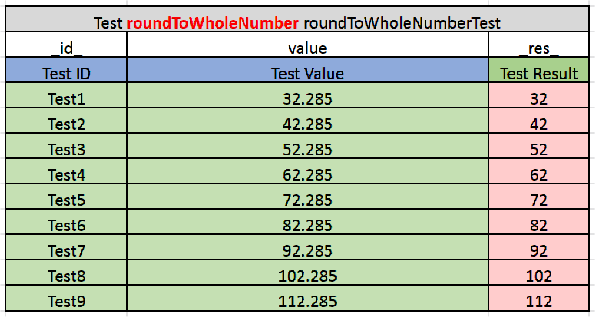
Test table for rounding to integer
round(number,int)
This function is used to round to a fractional number. The second parameter defines a number of digits after decimal point.

Rounding to a fractional number
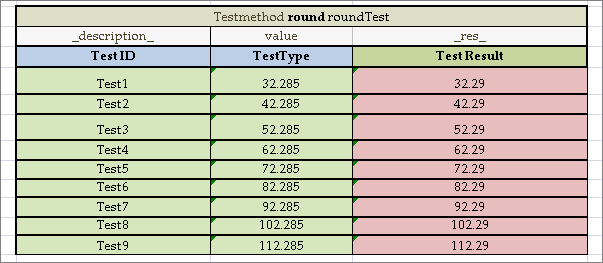
Test table for rounding to a fractional number
round(number,String)
This syntax is used to round to a whole number, where the String value denotes the rounding mode as described in the following table:
| Mode name | Description |
|---|---|
| UP | Rounding mode to round away from zero. |
| DOWN | Rounding mode to round towards zero. |
| CEILING | Rounding mode to round towards positive infinity. |
| FLOOR | Rounding mode to round towards negative infinity. |
| HALF_UP | Rounding mode to round towards the nearest neighbor unless both neighbors are equidistant, in which case round up. |
| HALF_DOWN | Rounding mode to round towards the nearest neighbor unless both neighbors are equidistant, in which case round down. |
| HALF_EVEN | Rounding mode to round towards the nearest neighbor unless both neighbors are equidistant, in which case, round towards the even neighbor. |
| UNNECESSARY | Rounding mode to assert that the requested operation has an exact result, hence no rounding is necessary. |
An example is as follows:
round(32.285,DOWN)=32
Note: In the code, both CEILING and RoundingMode.CEILING formats are acceptable.
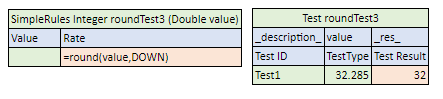
Usage of the round(number,String) format with the DOWN rounding mode
round(number,int,int)
This function allows rounding to a fractional number and get results by applying different mathematical rules. The following parameters are expected:
- Number to round
- The first
intstands for a number of digits after decimal point. - The second
intstands for a rounding mode represented by a constant, for example,1- round_DOWN,4-ROUND_HALF_UP.
The following table contains a list of the constants and their descriptions:
| Constant | Name | Description |
|---|---|---|
| 0 | UP | Rounding mode to round away from zero. |
| 1 | DOWN | Rounding mode to round towards zero. |
| 2 | CEILING | Rounding mode to round towards positive infinity. |
| 3 | FLOOR | Rounding mode to round towards negative infinity. |
| 4 | HALF_UP | Rounding mode to round towards the nearest neighbor unless both neighbors are equidistant, in which case round up. |
| 5 | HALF_DOWN | Rounding mode to round towards the nearest neighbor unless both neighbors are equidistant, in which case round down. |
| 6 | HALF_EVEN | Rounding mode to round towards the nearest neighbor unless both neighbors are equidistant, in which case, round towards the even neighbor. |
| 7 | UNNECESSARY | Rounding mode to assert that the requested operation has an exact result, hence no rounding is necessary. |
For more information on the constants representing rounding modes, see https://docs.oracle.com/en/java/javase/21/docs/api/constant-values.html#java.math.BigDecimal.ROUND_HALF_DOWN.
For more information on the constants with examples, see https://docs.oracle.com/en/java/javase/21/docs/api/java.base/java/math/RoundingMode.html, Enum Constant Details section.
The following example demonstrates how the rounding works with the DOWN constant.
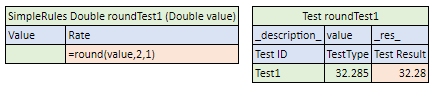
Usage of the round(number,int,int/String) format with the DOWN rounding mode
round(number,int,String)
This function allows rounding to a fractional number and get results by applying different mathematical rules. The following parameters are expected:
- Number to round
intstands for a number of digits after decimal point.Stringstands for a rounding mode as described in round(number,String).
An example is as follows:
round(32.285, 2, DOWN)=32.28
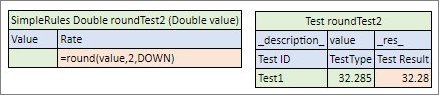
Usage of the round(number,int,int/String) format with the DOWN rounding mode
Understanding Date Functions
OpenL Tablets supports a wide range of date functions that can be applied in the rule tables. The following date functions return an Integer data type:
| Function | Description |
|---|---|
| absMonth | Returns the number of months since AD. absMonth(Date) |
| absQuarter | Returns the number of quarters since AD as an integer value. absQuarter(Date) |
| Date | Returns the date. The following options are available: - Date(year, month, day, hours, minutes) - Date(year, month, day, hours, minutes, seconds) - Date(year, month, day, hours, minutes, seconds, milliseconds) |
| dayOfWeek | Takes a date as input and returns the day of the week on which that date falls. Days in a week are numbered from 1 to 7 as follows: 1=Sunday, 2=Monday, 3 = Tuesday, and so on. dayOfWeek(Date d) |
| dayOfMonth | Takes a date as input and returns the day of the month on which that date falls. Days in a month are numbered from 1 to 31. dayOfMonth(Date d) |
| dayOfYear | Takes a date as input and returns the day of the year on which that date falls. Days in a year are numbered from 1 to 365. dayOfYear(Date d) |
| hour | Returns the hour of the day in 12 hour format for an input date. hour(Date d) |
| hourOfDay | Returns the hour of the day in 24 hour format for an input date. hourOfDay(Date d) |
| isLeap | Identifies whether the year is a leap year. The following options are available: - isLeap(Date) - checks whether the provided date is in the leap year. - isLeap(Integer) - checks whether the provided year is a leap year. |
| minute | Returns a minute (0 to 59) for an input date. minute(Date d) |
| second | Returns a second (0 to 59) for an input date. second(Date d) |
| setTime | Sets time or date. The following options are available: - setTime(Date, hours, minutes) - sets time in hh:mm:xx.xxx without changing the date. - setTime(Date, hours, minutes, seconds) - sets time in hh:mm:ss.xxx without changing the date. - setTime(Date, hours, minutes, seconds, milliseconds)- sets time in hh:mm:ss.ccc without changing the date. - setDate(Date, year, month, day)- sets the date in yyyy-mm-dd without changing the time. |
| weekOfMonth | Takes a date as input and returns the week of the month within which that date is. Weeks in a month are numbered from 1 to 5. weekOfMonth(Date d) |
| weekOfYear | Takes a date as input and returns the week of the year on which that date falls. Weeks in a year are numbered from 1 to 54. weekOfYear(Date d) |
The following date function returns a String data type:
| Function | Description |
|---|---|
| amPm(Date d) | Returns Am or Pm value for an input date. amPm(Date d) |
The following figure displays values returned by date functions for a particular input date specified in the MyDate field.
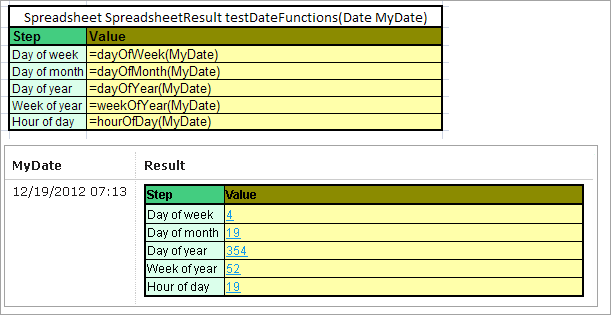
Date functions in OpenL Tablets
The following decision table provides a very simple example of how the dayOfWeek function can be used when the returned value, Risk Factor, depends on the day of the week.
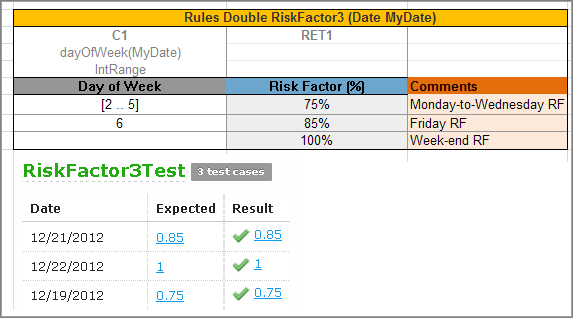
A risk factor depending on a day of the week
Understanding Special Functions and Operators
OpenL Tablets supports a variety of different special functions and syntax to make rules creation easier and more convenient for business users.
The following topics are included in this section:
Error Function
The ERROR function is used to handle exceptional cases in a rule when an appropriate valid returned result cannot be defined. The function returns a message containing problem description instead and stops processing. The message text is specified as the error function parameter.
In the following example, if the value for a coverage limit of an insurance policy exceeds 1000$, a rule notifies a user about wrong limit value and stops further processing.
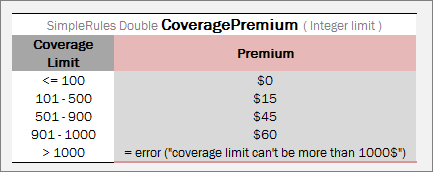
Usage of the ERROR function
Alternatively, a custom error with custom error message can be defined as arguments using the error(String code, String message) function. The expected REST response is as follows:
{
    "code": "cd01",
    "message": "User message"
}
Ternary Operator
?: is a ternary operator that is a part of the syntax for simple conditional expressions. It is commonly referred to as the conditional operator, inline if (iif), or ternary if.
Formula (expression) ? (value1) : (value2) returns value1 if condition expression is true, otherwise, value2.
:(value2) part is optional. If it is not defined, null is returned if the condition is false.
An example of a ternary operator is as follows:

Ternary operator example
In if-then expression, this example stands for the following:
If (useCensus == true) then { Amount step value = percentAmount} else { Amount step value = flatAmount}.
For more information on ternary operators, see https://en.wikipedia.org/wiki/Ternary_operation.
To create more complex conditional expressions, use decision tables.
Performing Operations via Formula
A user can write several operations in a cell’s formula or in expression statement of the Decision table by separating each operation with the ‘;’ sign. The result of the last operation is defined as a returned value of the cell as follows:
'= Expression1; Expression2; …; ResultedExpression
In practice, it is widely used when a user needs to store calculated values in the input object fields by using the following syntax:
'= field = value
or
'= field1 = value1; field2 = value2 …; ResultedExpression
In the following example, the Age step calculates the age and stores the result in the vehicleAge field of the input object vehicle, the Scoring step calculates several scoring parameters, stores them in the scoring object, and returns the object with updated fields as a result of the step:

Example of performing operations via formula
Pattern-Matching Function
A pattern-matching function allows verifying whether a string value matches the predefined pattern. For example, for emails, phone numbers, and zip codes the following function can be used:
like (String str, String pattern)
The result is a Boolean value indicating whether the string equals the pattern.
The like function provides a versatile tool for string comparison. The pattern-matching feature allows a user to match each character in a string against a specific character, a wildcard character, a character list, or a character range. The following table lists the characters allowed in a pattern and describes what they match:
| Characters in pattern | Meaning |
|---|---|
| ? | One character. |
| * | Zero or multiple characters. |
| # | One digit. |
| @ | One letter. |
| [a-k] | One character from the set. |
| [!v-z] | One character not from the set. |
| Pattern+ | Pattern applied at least once. |
| [?] | Match to ‘?’. |
| [*] | Match to ‘*’. |
| [#] | Match to ‘#’. |
| [@] | Match to ‘@’. |
| [+] | Match to ‘+’. |
| [!] | Match to ‘!’. |
| [!!] | NOT match to ‘!’. |
| [1!] | Match to ‘!’ or ‘1’. |
| [!1] | NOT match to ‘1’. |
| [-1-3] | Match to ‘-‘, ‘1’, ‘2’, ‘3’. |
Examples are as follows:
like("(29)687-11-53", "(##)###-##-##") -> TRUE
like ("(29)87-11-53", "(##)###-##-##") -> FALSE
like ("D1010", "[A-D]####") -> TRUE
like ("F1010", "[A-D]####") -> FALSE
Null Elements Usage in Calculations
This section describes how null elements (an element with an empty value) are processed in calculations.
For adding and subtracting, null is interpreted as 0.
For multiplying and dividing, it is interpreted as null. That is, if a=3 and b=null, a*b=null.
The following diagrams demonstrate this rule.
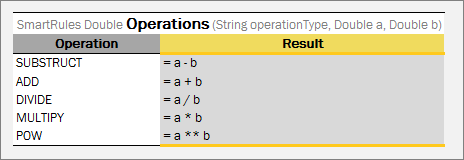
Rules for null elements usage in calculations
The next test table provides examples of calculations with null values.
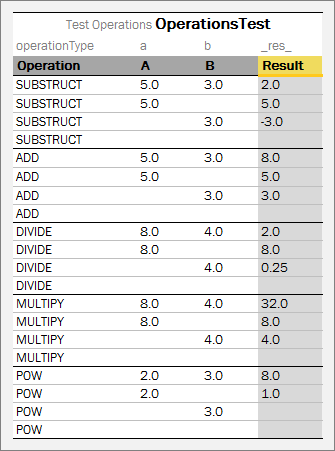
Test table for null elements usage in calculations
If all values are null, the result is also null.