Decision Table
A decision table contains a set of rules describing decision situations where the state of a number of conditions determines execution of a set of actions and returned value. It is a basic table type used in OpenL Tablets decision making.
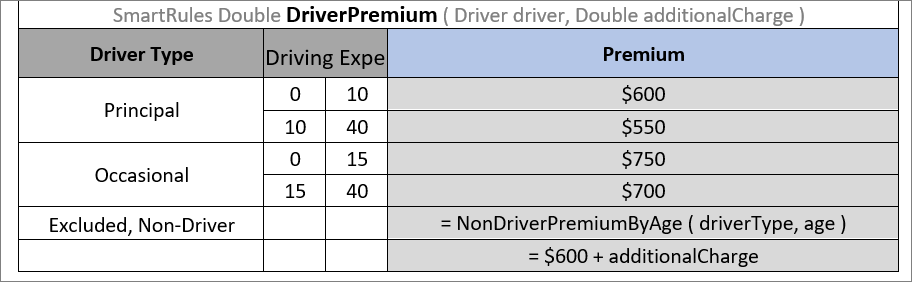
Decision table example
The following topics are included in this section:
- Decision Table Structure
- Decision Table Interpretation
- Simple and Smart Rules Tables
- Simple and Smart Lookup Tables
- External Tables Usage in Smart Decision Tables
- Ranges and Arrays in Smart and Simple Decision Tables
- Rules Tables
- Collecting Results in Decision Table
- Local Parameters in Decision Table
- Transposed Decision Tables
- Representing Values of Different Types
- Using Calculations in Table Cells
- Referencing Attributes
- Calling a Table from Another Table
- Using Referents from Return Column Cells
- Using Rule Names and Rule Numbers in the Return Column
- Using References to Expressions
Decision Table Structure
An example of a decision table is as follows:
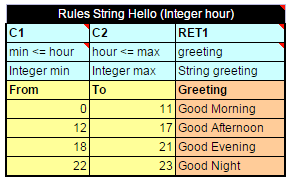
Decision table
The following table describes the full structure of a decision table with the Rules keyword:
| Row number |
Mandatory | Description |
|---|---|---|
| 1 | Yes | Table header, which has the following pattern: <keyword> <rule header> where <keyword> is either ‘Rules’ or ‘DT’ and <rule header> is a signature of a table with names and types of the rule and its parameters used to access the decision table and provide input parameters. |
| 2 | Yes | Row consisting of the following cell types: - Condition column header Identifies that the column contains a rule condition and its parameters. It must start with the “C” character followed by a number or be “MC1” for the 1st column with merged rows. If the condition has several parameters, the cell must be merged on all its parameter columns. Examples: C1, C5, C8, MC1 - Horizontal condition column header Identifies that the column contains a horizontal rule condition and its parameter (horizontal condition can have only one parameter). It must start with the “HC” character followed by a number. Horizontal conditions are used in lookup tables only. Examples: HC1, HC5, HC8 - Action column header Identifies that the column contains rule actions. It must start with the “A” character followed by a number. Examples: A1, A2, A5 - Return value column header Identifies that the column contains values to be returned to the calling program. A table can have multiple return columns, however, only the first fired non-empty value is returned. Example: RET1 All other cells in this row are ignored and can be used as comments. If a table contains action columns, the engine executes actions for all rules with true conditions. If a table has a return column, the engine stops processing rules after the first executed rule with true conditions and non-empty result found. |
| 3 | Yes | Row containing cells with expression statements for condition, action, and return value column headers. OpenL Tablets supports Java grammar enhanced with OpenL Tablets Business Expression (BEX) grammar features. For more information on the BEX language, see Introduction to BEX. In most cases, OpenL Tablets Business Expression grammar covers all the variety of expression statements and an OpenL user does not need to learn Java syntax. The code in these cells can use any objects and functions visible to the OpenL Tablets engine as elsewhere. For more information on enabling the OpenL Tablets engine to use custom Java packages, see Configuration Table. The purpose of each cell in this row depends on the cell above and is as follows: - Condition column header Specifies the logical expression of the condition. It can reference parameters in the table header and parameters in cells below. The cell can contain several expressions, but the last expression must return a Boolean value. All condition expressions must be true to execute a rule. - Horizontal condition The same as Condition column header. - Action column header Specifies expression to be executed if all conditions of the rule are true. The expression can reference parameters in the rule header and parameters in the cells below. - Return value column header Specifies expression used for calculating the return value. The type of the last expression must match the return value specified in the rule header. The explicit return statement with the keyword “return” is also supported. This cell can reference parameters in the rule header and parameters in the cells below. |
| 4 | Yes | Row containing parameter definition cells. Each cell in this row specifies the type and name of parameters in the cells below it. Parameter name must be one word long. Parameter type must be one of the following: simple data types, aggregated data types, or Java classes visible to the engine; arrays of the above types as described in Representing Arrays. |
| 5 | Yes | Descriptive column titles. The rule engine does not use them in calculations but they are intended for business users working with the table. Cells in this row can contain any arbitrary text and be of any layout that does not correspond to other table parts. The height of the row is determined by the first cell in the row. |
| 6 and below |
Yes | Concrete parameter values. Any cell can contain formula, a mathematical one or a rule call, instead of concrete value and calculate the value. This formula can reference parameters in the rule header and any parameters of condition columns in the return column. |
A user can merge cells of parameter values to substitute multiple single cells when the same value needs to be defined in these single cells. During rule execution, OpenL Tables unmerges these cells.
The additional Rule column with merged cells is used as the first column when the return value must be a list of values written in multiple rows of the same column, that is, a vertically arranged array. The Rule column determines the height of the result value list.
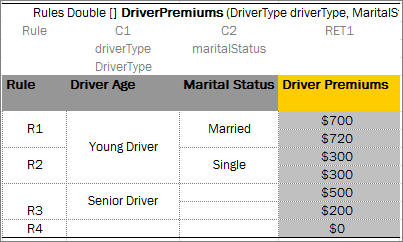
A table with the Rule column as the first column
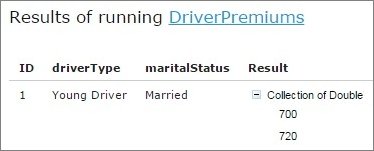
Result in the vertically arranged array format
The rule column can be defined for rules tables and smart rules tables.