Local Parameters in Decision Table
When declaring a decision table, the header must contain the following information:
- column type
- code snippet
- declarations of parameters
- titles
Recent experience shows that in 95% of cases, users add very simple logic within code snippet, such as just access to a field from input parameters. In this case, parameter declaration for a column is useless and can be skipped.
The following topics are included in this section:
Simplified Declarations
Case#1
The following image represents a situation when users must provide an expression and simple equal operation for condition declaration.
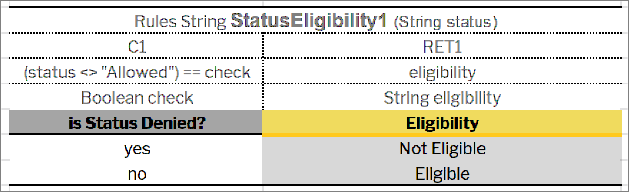
Decision table requiring an expression and simple equal operation for condition declaration
This code snippet can be simplified as displayed in the following example.
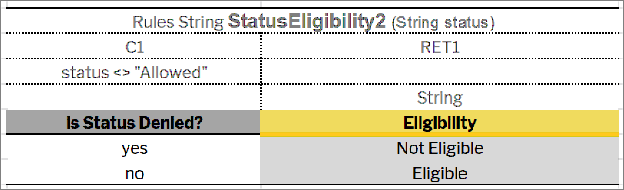
Simplified decision table
OpenL Engine creates the required parameter automatically when a user omits parameter declaration with the following information:
- The parameter name will be P1, where 1 is index of the parameter.
- The type of the parameter will be the same as the expression type.
In this example, it will be Boolean.
In the next step, OpenL Tablets will create an appropriate condition evaluator.
Note: The parameter name can be omitted in the situation when the contains(P1, expression value) operation for condition declaration is to be applied. The type of the parameter must be an array of the expression value type.
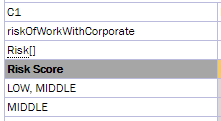
Simplified condition declaration
Case#2
The following example illustrates the Greeting rule with the min <= value and value < max condition expression.
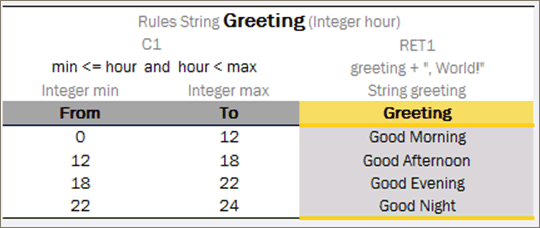
The Greeting rule
Instead of the full expression min <= value and value < max, a user can simply use value and OpenL Tablets automatically recognizes the full condition.
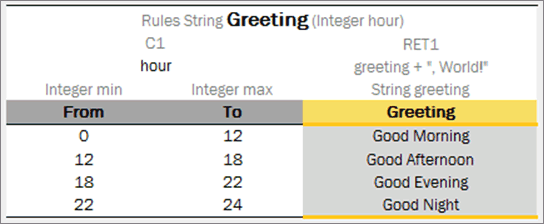
Simplified Greeting rule
Performance Tips
Time for executing the OpenL Tablets rules heavily depends on complexity of condition expressions. To improve performance, use simple or smart decision table types and simplified condition declarations.
To speed up rules execution, put simple conditions before more complicated ones. In the following example, simple condition is located before a more complicated one.
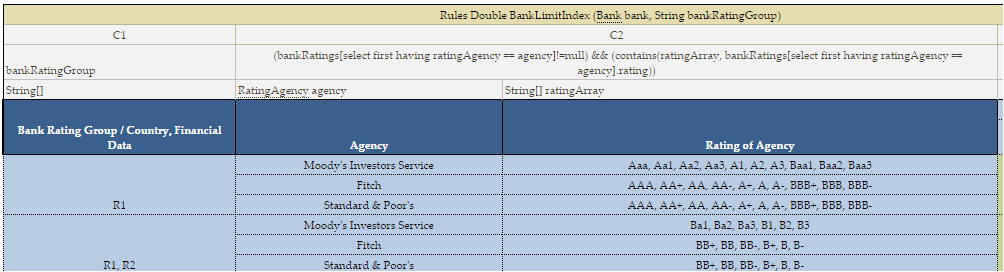
Simple condition location
The main benefit of this approach is performance: expected results are found much faster.
OpenL Tablets enables users to create and maintain tests to ensure reliable work of all rules. A business analyst performs unit and integration tests by creating test tables on rules through OpenL Studio. As a result, fully working rules are created and ready to be used.
For test tables, to test the rule table performance, a business analyst uses the Benchmark functionality. For more information on this functionality, see OpenL Studio Guide.