Keywords Usage in a File Name
The Any keyword can be used for rule module versioning, for all business enumeration properties. Enumeration properties have a predefined and finite list of values. Examples of enumeration properties are currency, state, province, region, and language. The Any keyword can substitute any enumeration property values. For the property pattern .*-%state%-%effectiveDate %-%currency %, examples are Vision Rules-Any-20190101-USD.xlsx and Vision Rules-NY-20190101-Any.xlsx.
An alternative keyword for the state business property is CW, which stands for country wide. If the CW value is set to the Property State in a file name, the rules of the corresponding module work for any state. Usually, only one value can be indicated in the file name and listing all values in a filename is not available. This feature enables listing all values for property state in a file name by defining the CW value instead. It is useful when, for instance, there are particular files with rules for particular states, and a file with rules common for all states.
To use the feature, define the Properties pattern for a file name as described in Properties Defined in the File Name.
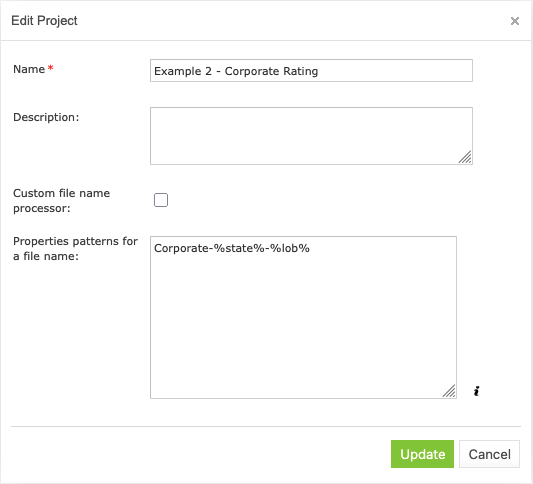
Defining a property pattern for a state and line of business
For instance, consider the Corporate Bank Calculation project configured as displayed in the previous figure. The project module with the CORPORATE-CW-TEST.xlsx file name has the following property values:
- US State is any state
- lob = test
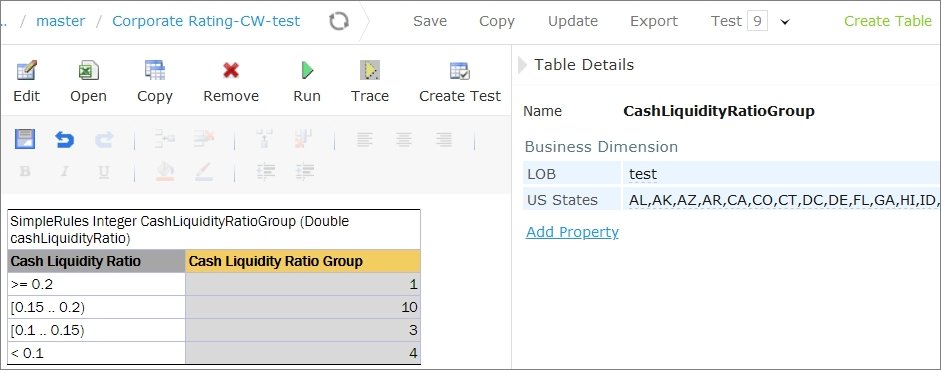
Decision table overloaded with all states
To configure a module with the logic specific for one state or a group of states, for example, for NY, name the module CORPORATE-NY-TEST.xlsx and ensure it has the following property values defined:
- US State = NY
- lob = test
CW includes all states, but as long as NY specific module is created in this example, OpenL Tablets selects this specific module.