External Tables Usage in Smart Decision Tables
Conditions, returns, and actions declarations can be separated and stored in specific tables and then used in Smart Decision Tables via column titles. It allows using the Smart Table type for Decision rule even in case of the complicated condition or return calculation logic. Another benefit is that condition and return declarations can be reused in several rules, for example, Conditions table as a template. An example is as follows.
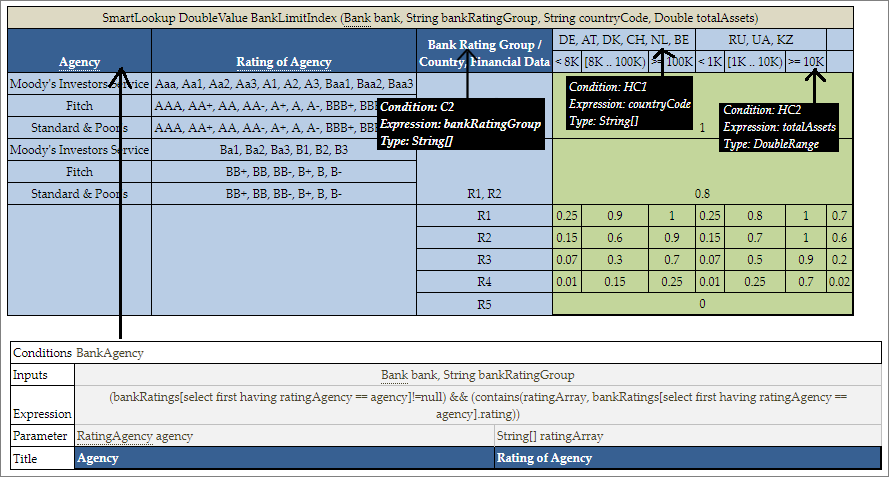
Using external conditions in a smart rules table
In this example, the first condition definition is taken from a separate Conditions table, an external table, and matched by column titles Agency and Rating of Agency. In OpenL Studio, such titles have links leading to the corresponding table. Other conditions are matched implicitly with input parameters by their names. In OpenL Studio, such titles have hints with all corresponding information.
Names of external tables have higher priority over input parameters. First of all, the engine checks if an external table with such name exists and if it is not found, the engine treats the column title as an input parameter. In the preceding example, OpenL Tablets first searches for an external table named Agency and finds it. Otherwise, the engine would treat Agency as input parameter.
External condition/return/action title must exactly match the title of the condition/return/action in the smart decision table. Inputs are matched by smart logic analyzing data types and names. Exact name matching is not required.
The external element table structure is as follows:
- The first row is the header containing the keyword, such as Actions, Conditions, or Returns, and optionally the name of the table.
- The first column under the header contains keyword, such as Inputs, Expression, Parameter, and Title.
-
Every column, starting from the second one, represents the element, that is, condition, action, and return definition.
Rows with the corresponding keyword contain the following information in the condition, action, and return definition rows:
Element Description Input Defines input parameters required for expression calculation of the element. It can be common for several expressions when cells are merged.
Input is optional for Returns and Actions.Expression Specifies the logical expression of the element. It must be merged accordingly if an element includes several parameters defined below. Parameter Stores parameter definition of the element. Title Provides a descriptive column title that is later used in the Smart Decision rule. - The first column with keywords can be omitted if the default order Inputs – Expression – Parameter – Title is used.