Using Advanced Data Tables
Advanced data tables are used for storing information of a complex structure, such as custom data types and arrays. For more information on data types, see Datatype Table.
-
The first row of an advanced data table contains text in the following format:
Data <data type> <data table name> -
Each cell in the second row contains an attribute name of the data type.
For an array of objects, the [i] syntax can be used to define an array of simple datatypes, and [i]. <attributeName> to define an array of custom datatypes.
- The third row contains attribute display names.
- Each row starting from the fourth one contains values for specific data rows.
The following diagram displays a datatype table and a corresponding data table with concrete values below it.
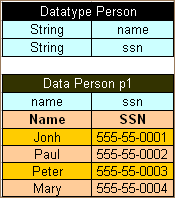
Datatype table and a corresponding data table
Note: There can be blank cells left in data rows of the table. In this case, OpenL Tablets considers such data as non-existent for the row and does not initialize any value for it, that is, there will be a null value for attributes or even null for the array of values if all corresponding cells for them are left blank.
There might be a situation when a user needs a Data table column with unique values, while other columns contain values that are not unique. In this case, add a column with the predefined _PK_ attribute name, standing for the primary key. It is called an explicit definition of the primary key.
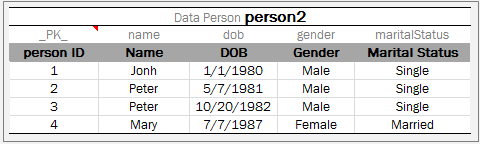
A Data table with unique _PK_ column
If the _PK_ column is not defined, the first column of the table is used as a primary key. This is called an implicit definition of the primary key.
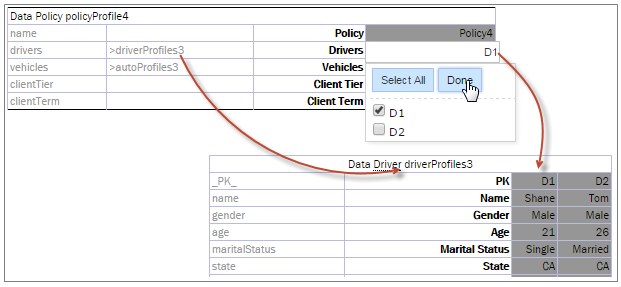
Referring from one Data table to another using a primary key
A user can call any value from a data table using the following syntax:
<datatable name>[<number of row>] Example: testcars[0]
<datatable name>["<value of PK>"] Example: testcars["BMW 35"]