Collecting Results in Decision Table
A decision table returns only the first fired, non-empty result in common case. But there are business cases when all rules in a table must be checked and all results found returned. To do so, use:
Collectkeyword right before<Return type>in the table header for Simple and Smart rule table types;CRETas the return value column header for a regular decision table type;- Define
<Return type>as an array.
In the example below, rule InterestTable returns the list of interest schemes of a particular plan:
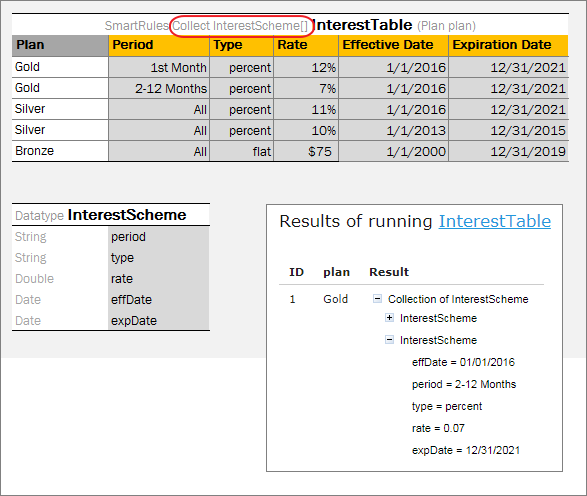
Collecting results in Smart and Simple rule table
In the following example, rule PriceTable collects car price information for desired specified country and/or ”make” of a car:
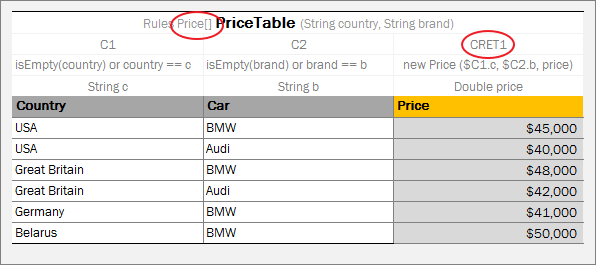
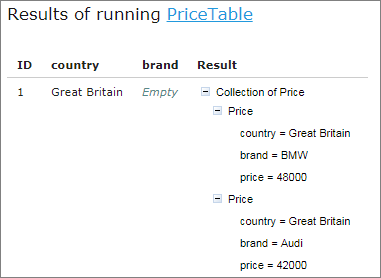
Collecting results in regular Decision table
Note for experienced users: Smart and Simple rule tables can return the collection of List, Set, or Collection type. To define a type of a collection element, use the following syntax: Collect as <Element type> <Collection type> for example, SmartRules Collect as String List Greeting (Integer hour).