Introducing OpenL Studio
Introducing OpenL Studio
This chapter introduces main OpenL Studio concepts. The following topics are included in this chapter:
- What Is OpenL Studio?
- Working with Projects in OpenL Studio
- OpenL Studio Components
- Security Overview
What Is OpenL Studio?
OpenL Studio is a web application employed by business users and developers to view, edit, and manage business rules and rule projects created using OpenL Tablets technology. For more information on OpenL Tablets, see OpenL Tablets Reference Guide.
By using OpenL Studio, users can modify rules directly in a web browser without installing additional tools. OpenL Studio provides an advanced functionality for creating and modifying rules, viewing errors, and executing tests.
Working with Projects in OpenL Studio
OpenL Studio is intended for a multi-user environment. It provides a centralized storage of rule projects called Design repository. Design repository is stored on the OpenL Studio server and can be accessed by any user. However, users cannot modify projects directly in Design repository. Instead, to make modifications to a project, users must execute the following procedure:
| Step | Action | Description |
|---|---|---|
| 1 | Open a project. | When a project is opened, its status is set to No Changes, and a copy of it is created in the user’s workspace, a specific location on the OpenL Studio server. Work copies of projects made editable by a particular user are stored there. Users can only access their personal workspaces. |
| 2 | Modify a project. | After any modification of a project, its status is set to In Editing. A project in the In Editing status is locked in Design repository to avoid loss of information. Other users cannot edit it until the project is saved. Other users can only open the project in read-only mode, with the No Changes status. Modifications to a project in the In Editing status are performed on the working copy stored in the user’s workspace. Modifications do not become immediately visible to other users. |
| 3 | Save a project. | Saving a project copies the modified copy of the project from the user’s workspace to Design repository. A new revision of the project is created in Design repository. A project can be restored to any of its previous revisions. In this case, its status is set to Viewing Revision. From this moment, changes are visible to other users and the project is available for editing. |
Closing a project deletes it from the user’s workspace without saving changes and does not affect the revision in Design repository. Closed projects can be browsed in repository editor but are not available in Rules Editor.
The following diagram illustrates general rules project lifecycle. This is a simplified schema of rules development workflow where activities as opening, opening for editing, closing, and deleting the current project or deploying configuration are omitted.
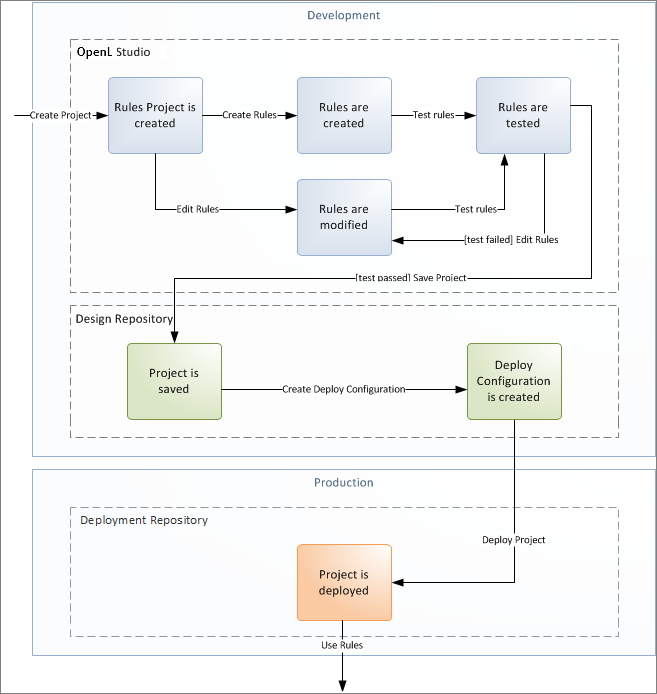
Rules project development workflow
Development of rules starts with creating a new project that will contain the rules. If the project already exists, it must be opened for editing. Then rules are created or updated and properly tested. After rules are completed and all tests are passed, a user saves the project. At this point, the updated revision of the project is saved to Design repository and applied changes of the project become available for viewing and editing by other users. If no more changes to the project are planned in the nearest future, a user can close the project.
A saved project revision can be deployed directly to the deployment repository to make updates available in the production environment.
If the project is not required any more, it can be deleted.
OpenL Studio Components
OpenL Studio consists of the following main components:
| Component | Description |
|---|---|
| Rules Editor | Graphic user interface running in a web browser allowing users to browse rule modules, modify table data, and run tests. Rule project configurations are browsed and updated there as well. Rules Editor is the default user interface displayed when a user opens OpenL Studio. Rules Editor does not display all rule module files but provides a logical view of rules stored in a module. This view is convenient for users who modify business rules. Rules Editor displays only modules available in projects stored in the user’s workspace. To retrieve a project to the user’s workspace, open the project as described in Working with Projects in OpenL Studio. For more information on using Rules Editor, see Using Rules Editor. |
| Repository editor | Graphic user interface running in a web browser allowing users to browse and manage projects in Design repository. Unlike Rules Editor, repository editor displays physical contents of rule projects. Users can easily switch between Rules Editor and repository editor in user interface. Repository editor provides the following main functions: - uploading projects from the file system to Design repository - editing, saving, opening, and closing projects - modifying project structure and properties managing project revisions - copying and deleting projects in Design repository - deploying projects to deployment repositories For more information on using repository editor, see Using Repository Editor. |
| Design repository | Centralized storage of rule projects accessible by all OpenL Studio users. Projects uploaded to Design repository are visible to other users. Design repository creates a separate project revision each time a project is saved. Any project revision can be opened. |
| Deployment repositories | Production storages of deployed rule projects where solution applications use them. Projects are deployed directly from Design repository to deployment repositories. |
| User workspace | Project storage on the server containing projects edited by users. Each user has a personal workspace unavailable to other users. |
Security Overview
OpenL Studio supports the following user modes:
| Mode | Description |
|---|---|
| Single-User | Only one user works in OpenL Studio at a time. This mode is set by default and does not require login. All user projects are located in the root of the user-workspace directory. User management and access control are not available in this mode. |
| Multi-User | Multiple users can work in OpenL Studio. Each user logs in with a unique name. Access to product functions is controlled by user roles. User credentials and permissions are managed within OpenL Studio. User projects are located in the user-workspace\<user name> directory. |
| Active Directory | Multiple users authenticate using their Active Directory or LDAP credentials. User authentication is handled by the directory service. User permissions can be managed in OpenL Studio or Active Directory. User projects are located in the user-workspace\<user name> directory. |
| SSO: SAML | Multiple users authenticate through a SAML-supporting identity provider server. User permissions can be managed in OpenL Studio or the identity provider. User projects are located in the user-workspace\<user name> directory. |
| SSO: OIDC (OAuth2) | Multiple users authenticate through an OAuth2/OIDC-supporting identity provider server. User projects are located in the user-workspace\<user name> directory. |