Smart Lookup Table
A lookup decision table with simple conditions that check equality or inclusion of an input parameter with a condition value and a direct return (without expression) can be easily represented as a smart lookup table. This table resembles a smart rules table but has horizontal conditions.
The smart lookup table header format is as follows:
SmartLookup <Return type> RuleName(<Parameter type 1> parameterName1, (<Parameter type 2> parameterName2,….)

Smart lookup table example
Condition matching algorithm for smart lookup tables is the same as for smart rules tables. For vertical conditions, the system searches for input parameters suitable by title and then, for horizontal conditions, the system selects input parameters starting with the first of the rest inputs.
Boolean conditions can be used in the smart lookup tables as column headers. For more information on these conditions, see Smart Rules Table.
The number of horizontal conditions is determined by the height of the first column title cell. This means that title cells of the vertical conditions must be merged on all rows which go for horizontal conditions.
The following is an example of a smart lookup table with several horizontal conditions:
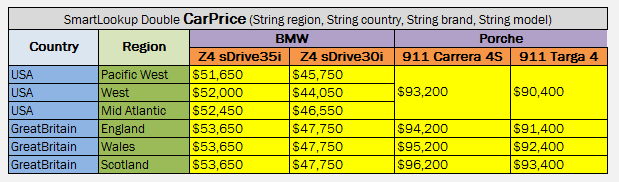
Smart lookup table with several horizontal conditions
OpenL Tablets supports titles for horizontal conditions. A horizontal condition title is defined either together with the last vertical condition header, separated by a slash character, or as a separate column after all vertical conditions.

Slash character in a red cell indicating that the cell contains condition titles for a vertical condition “Rating of Agency” and a horizontal condition “Total Assets”

Algorithm identifying the third column as horizontal condition titles because the third column values are empty
If the height of the horizontal condition is 1, and there is a vertical condition with an empty column, the horizontal titles must be started with a slash /.