Reviewing the Audit Log
Reviewing the Audit Log
The audit log records who signed in to OpenL Studio and when, whose sign-in was refused, who signed out, who changed users, groups, personal access tokens and access rights, which requests were refused for lack of permission, who created, saved, deleted and deployed projects and changed the branches of their repositories, who changed the system settings and the tags configuration, when OpenL Studio started, restarted and stopped, and who read the log itself. OpenL Studio keeps it in its database in every user mode but Single-User, which has no sign-in. Only users with administrator privileges see it.
In the navigation menu, click Audit Log. The page lists the events, the newest first, a page at a time. The list
counts up to 10,000 events: when more match, it shows 10000+ and pages through the newest 10,000. Narrow the
filters to reach older events, or export them.
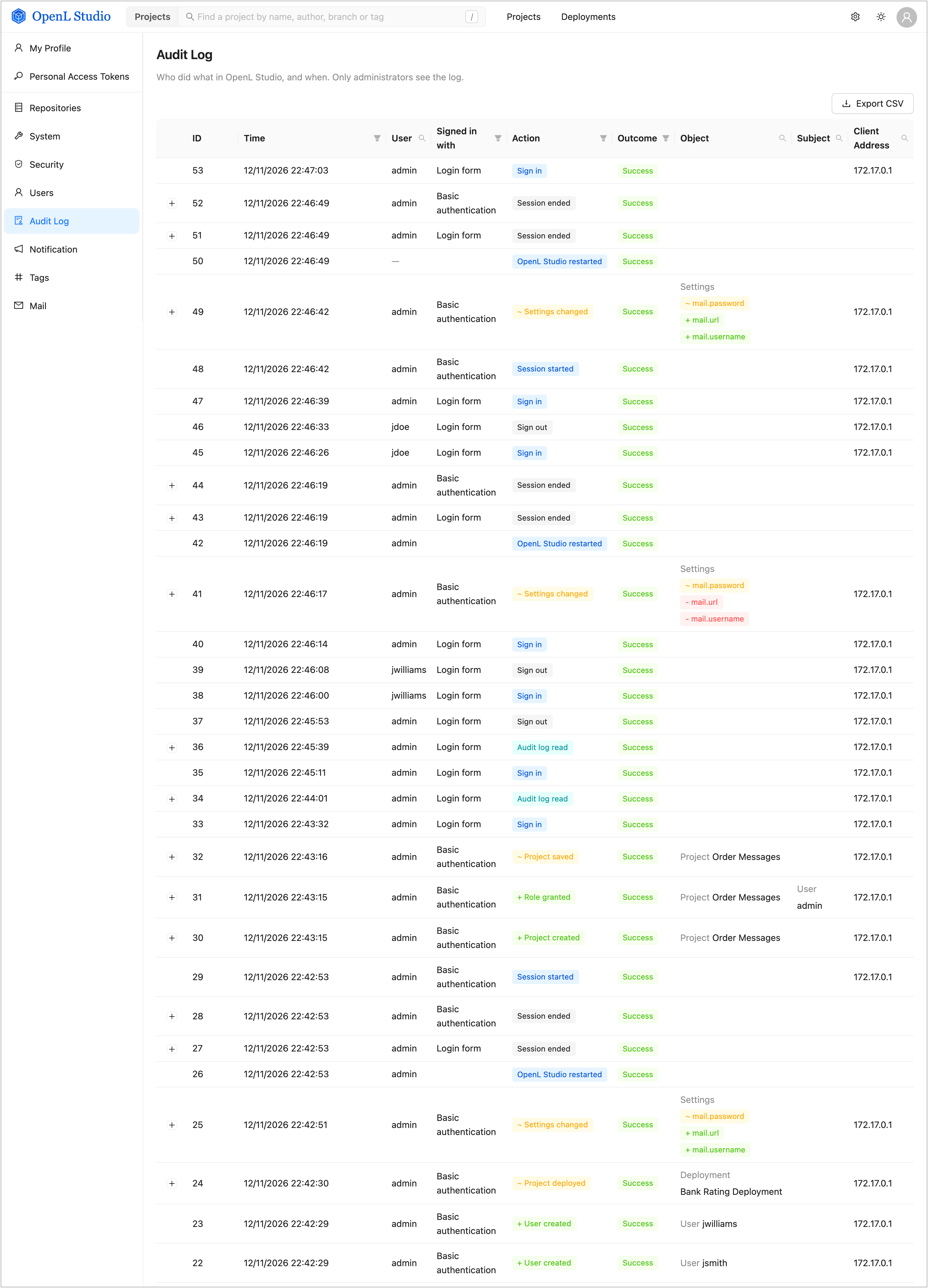
Audit log of OpenL Studio
Each event shows the following:
- ID — the number of the event, which tells it apart in the log and in an export.
- Time — when the event happened, to the second, in the time zone of the browser.
- User — who did the action. A refused sign-in names a user only when a user name was typed, or when a personal access token OpenL Studio knows was sent: then the owner of the token; a token is never recorded in its place. An action OpenL Studio does by itself, such as removing old events or a restart, names no user.
- Signed in with — how the user signed in, or tried to: Login form, Basic authentication, Personal access token, Bearer token, OpenID Connect or SAML. So an action a script or an agent did with a token tells so. An action that goes on after its request is answered tells it only for a token, OpenID Connect or SAML.
- Action — what was done, in the colour of what it did. A change is marked as the changes in the details are:
+on green when it created or gave something,-on red when it deleted or took something away, and~on yellow when it changed something; pointing at a mark names it. An action that changes nothing has no mark: a sign-in, a session started and a start or restart of OpenL Studio are blue, a sign-out, a session ended and a stop are grey, a read of the log is cyan, and a refused request or a bypassed branch protection is magenta. - Outcome — Success, Failure when the action failed, such as a sign-in with a wrong password, or Denied when it was refused for lack of permission.
- Object — what the action was done to.
- Subject — the user or group whose access or membership the action changed.
- Client Address — the address the request came from. Behind a proxy, it is the address of the client only when the server reads the address the proxy forwards, as the OpenL Studio Docker image does. For an action an AI agent made through the MCP server of OpenL Studio, it is the address of the agent.
Click the expand icon of an event to see its details, such as why a sign-in was refused. A change is shown as a diff is, under Changed, and pointing at a mark names the change:
~on yellow — a value changed: the value before the change, an arrow and the value after.+on green — a value added where there was none, or a group or privilege given.-on red — a value removed, or a group or privilege taken away.
A secret value, such as a password, is never shown: its line tells only that it changed. A change of the server environment names the settings without their values, and notes that their values are never recorded.
The Object of a settings change marks each setting it changed the same way. It names the first ten settings and the number of the others, which the details list. A long name is cut short there: point at it to read it whole.
The details of an action an AI agent made through the MCP server of OpenL Studio tell so: Through is
MCP server, and MCP client names the agent and its version as the agent reports them, such as
claude-code 2.1.0. A script that calls the REST API of OpenL Studio directly has no such details.
The details never hold a password or a token: a personal access token is named by its public identifier. A repository that keeps projects in folders of their own can hold several projects of one name, so there the details of a project also name its folder.
The log records these actions:
- Sign in — a sign-in through the login form, SAML or OpenID Connect. A refused sign-in is recorded for every way of signing in, including Basic authentication, a bearer token and a personal access token, with the reason. For a personal access token, the reason tells an unknown token, a value that is not a token, a wrong secret, an expired token and an owner who may not sign in apart.
- Sign out — a sign-out, including one the identity provider asks for.
- Session started — a script or an agent that sends its credentials with every request, such as a personal access token, signs in with every request and opens no browser session, but OpenL Studio keeps a session for it, with its state, such as its compiled projects. The session starts at the first request of the credentials, and at the first one after the session ended. A personal access token is named by its public identifier.
- Session ended — a session, of a browser or of a script, that ended without a sign-out: left unused for longer than a session may stay idle, 30 minutes by default, marked as timed out, or ended by a restart of OpenL Studio, marked as restarted. A script whose sessions start and end again and again had its state set up anew each time, and its projects compiled again.
- User created, User changed, User deleted — a user created, deleted, or with a new name, display name, e-mail or e-mail verification, with the values before and after. A user that the identity provider creates or changes at sign-in is marked as coming from the identity provider.
- Password changed — a password set for a user. The password itself is never recorded.
- Added to group, Removed from group — a user put into a group or taken out of it: the group is the object and the user is the subject. A user joins or leaves a group of OpenL Studio at sign-in too, when the identity provider starts or stops reporting a group of the same name: such an event is marked as coming from the identity provider and names the privileges of the group.
- External groups changed — the groups the identity provider reports for a user changed at sign-in, with the groups added and removed.
- Group created, Group changed, Group deleted — a group created, deleted, renamed or described anew.
- Group privileges changed — a privilege, such as the administrator privilege, given to a group or taken from it.
- Token created, Token deleted — a personal access token, named by its public identifier and its name.
- Role granted, Role changed, Role revoked — a role, such as Viewer or Manager, given to a user or a group, replaced or taken away, with the roles before and after. The object is where the role is held: all the design or all the production repositories, a repository or a project. The subject is the user or the group. The roles a group gets in its editor and the access rights overwritten all at once through the REST API are recorded the same way. A group the identity provider reports anew at sign-in gives the user every role the group holds, and a group it no longer reports takes them away: each such role is recorded as Role granted or Role revoked for the user, marked as coming from the identity provider and naming the group. A role the user holds already, by itself or through another group, is recorded all the same.
- Access denied — a request refused because the user may not do what it asks, such as a change of the access rights of a project the user does not manage. The object is the path of the request; the details hold its method and the reason given to the user.
- Project created, Project copied — a project created from a template, from files or from an archive, or as a copy of another project, with its repository, branch and revision. Its creator gets the Contributor role on it, recorded as Role granted, unless the project already had access rights that another branch still uses. The roles a removed project left in the folder are revoked, each recorded as Role revoked.
- Project saved — the changes of a project saved to its repository, with the revision and the comment. An archive uploaded over a project and the files chosen to resolve the conflicts of a save are recorded as a save too. A file written to a closed project through the REST API is a revision of the repository with its author, not an event of the log.
- Project deleted — a project deleted, with the comment. When no branch holds the project any longer, its access rights go with it, and each role it had is recorded as Role revoked.
- Project unlocked — the lock of another user released by force, naming that user.
- Branch created, Branch deleted — a branch of a design repository, which is the object, created from a branch or a revision, or deleted with the projects only it held. The access rights of those projects go with them, and each role they had is recorded as Role revoked.
- Branches merged — a branch merged into another one, also when the conflicts of the merge were resolved first.
- Branch protection bypassed — a protected branch changed by a user allowed to bypass its protection, who confirmed it.
- Project deployed — a project deployed to a production repository: the deployment is the object, and the details name the project, its repository, branch and revision, and the comment.
- Settings changed — the system settings an administrator saved, such as the mail server or a repository: one
event for each save, which names the settings it changed as the object and lists each of them with its value
before and after. A value that refers to an environment variable or to another setting, such as
${MAIL_URL}, is recorded as it is written, never as the value it stands for. The value of a secret setting, such as a password or an access key, is never recorded: the event tells only that it changed. The credentials a value holds, such as a token in the address of a repository, are hidden as***, and a long value is cut short. A setting the environment of the server sets, such as the values of a Helm chart, changes with a restart: the next start records the settings added, changed and removed since the last start by their names only, marked as coming from the server environment. No value of the environment is recorded. - Tag type created — a tag type added on the Tags page, by its name or from the tags found in projects, with whether it is extensible and required and the tags it was created with.
- Tag type changed — a tag type renamed, or Extensible or Required selected or cleared, with each value before and after.
- Tag type deleted — a tag type deleted, with the tags deleted with it.
- Tag types reordered — the tag types arranged in another order, with the order before and after.
- Tag added, Tag renamed, Tag deleted — a tag of a tag type, which is the object: the tag added or deleted, or its name before and after. A tag OpenL Studio creates for an extensible tag type, when a filled or a created project brings a value the tag type does not have, is recorded as added too.
- Project name templates changed — the templates saved by Save Templates, with the templates added and removed, and, when the templates that stayed changed their priority, with their order before and after.
- Tags filled for projects — the projects Fill Tags changed, all in one event, each with the tag values it got. The projects left alone are not part of it. Projects of one name are told apart by their repository and folder, which follow the name. A tag of a project changed on its Overview tab is part of the project files and is recorded as Project saved.
- OpenL Studio started — a start of OpenL Studio, with its version.
- OpenL Studio restarted — a restart that applied the saved system settings without a stop of the server. It ends every browser session, so the users sign in again, and each session it ended is recorded as ended.
- OpenL Studio stopped — a stop of OpenL Studio. A server stopped and started again records a stop and a start. A server that was killed or crashed records no stop.
- Audit log read — a view or an export of the log, with the filters it was made with. Every export is recorded. A view is recorded once, when it starts: searching, filtering and turning the pages, with nothing else done in between, add no event. Any other action of the user, a new sign-in included, makes the next view recorded again.
- Old events removed — the removal of the events older than the retention period, with their number.
A change that leaves every value as it was is not recorded.
Finding Events
Click the filter icon in the header of a column to filter the list by it. The list then shows the events that match the filters of all the columns, from its first page:
- Time — the first and the last second of the events, both included. Either one can be left open.
- User, Object, Subject and Client Address — text the name or the address contains, in any case. Type the text and press Enter; clear it to drop the filter. Object finds an event made on a project by the name of the project too, such as a branch created from it or its deployment, so it finds everything done to a project.
- Signed in with — how the users who did the actions signed in, such as Personal access token.
- Action — the actions, each one by itself or all the actions of an area, such as Sign-in. Type in the search of the filter to find an action.
- Outcome — how the actions ended.
While a filter is set, Clear filters above the list drops all of them.
Exporting the Audit Log
Click Export CSV to save every event the filters match as a CSV file, a line per event, its ID first. The time is written in UTC, and a value a spreadsheet application would run as a formula is written as text. Every export is recorded in the log, with its filters.
Keeping the Audit Log
By default, the events are kept forever. A retention period removes the older events once a day, and a copy of every
event can also go to the console for a log collector. Both are set in the Audit Log section of the
System page, or as properties, as described in
Audit Log of the configuration guide. The period is a number
with its unit, such as 90d or 1y: a number without its unit, such as 90, is refused.