Test Table
This section describes test tables and context variables available in these tables. The following topics are included:
- Understanding Test Tables
- Context Variables Available in Test Tables
- Creating a Test Table for a Spreadsheet or Decision Table with SpreadsheetResult as Input Parameter
Understanding Test Tables
A test table is used to perform unit and integration tests on executable rule tables, such as decision tables, spreadsheet tables, and method tables. It calls a particular table, provides test input values, and checks whether the returned value matches the expected value.
For example, in the following diagram, the table on the left is a decision table but the table on the right is a unit test table that tests data of the decision table.
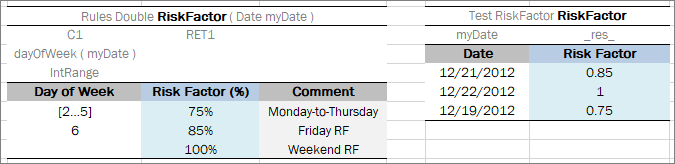
Decision table and its unit test table
A test table has the following structure:
-
The first row is the table header, which has the following format:
Test <rule table name> <test table name>Test is a keyword that identifies a test table. The second parameter is the name of the rule table to be tested. The third parameter is the name of the test table and is optional.
- The second row provides a separate cell for each input parameter of the rule table followed by the _res_ column, which typically contains the expected test result values.
- The third row contains display values intended for business users.
- Starting with the fourth row, each row is an individual test case.
For more information on how to specify values of input parameters and expected test results of complex constructions, see Specifying Data for Aggregated Objects and Ensuring Data Integrity.
If a test table field is a list or a map, it can be used to create a data table or test table in the same way as for data tables as described in Specifying Data in Data Tables with List and Map Fields.
Note for experienced users: Test tables can be used to execute any Java method. In this case, a method table must be used as a proxy.
When a test table is called, the OpenL Tablets engine calls the specified rule table for every row in the test table and passes the corresponding input parameters to it.
If there are several rule tables with a different number of parameters but identical names and a test table is applicable to all rule tables, the test table is matched with the rule table which list of test input parameters matches exactly the list of rules input parameters in the test table. If there are extra parameters in all rule tables, or input parameters of multiple rule tables match test input parameters exactly, the Method is ambiguous message is displayed.
Application runtime context values are defined in the runtime environment. Test tables for a table, overloaded by business dimension properties, must provide values for the runtime context significant for the tested table. Runtime context values are accessed in the test table through the _context_ prefix. An example of a test table with the context value Lob follows:
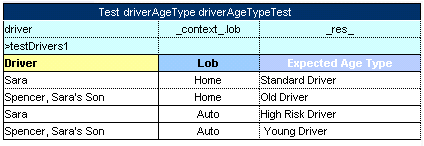
An example of a test table with a context value
For a full list of runtime context variables available, their description, and related Business Dimension versioning properties, see Context Variables Available in Test Tables.
Tests are numbered automatically. In addition to that, ID (id) can be assigned to the test table thus enabling a user to use it for running specific test tables by their IDs as described in OpenL Studio Guide > Executing Tests for a Single Table.
The _description_ column can be used for entering useful information.
The _error_ column of the test table can be used for a test algorithm where the error function is used. The OpenL Tablets Engine compares an error message to the value of the _error_ column to decide if test is passed.
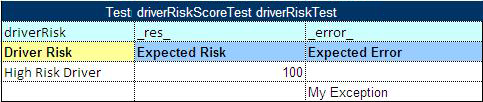
An example of a test table with an expected error column
If OpenL Tablets projects are accessed and modified through OpenL Studio, UI provides convenient utilities for running tests and viewing test results. For more information on using OpenL Studio, see OpenL Studio Guide.