Result of Custom Data Type in Smart and Simple Rules Tables
A simplified rules table can return the value of compound type (custom data type) – the whole data object. To accomplish this, the user must make return column titles close to the corresponding fields of the object so the system can associate the data from the return columns with the returned object fields correctly. For more information on datatype tables, see Datatype Table.
In the example below, the rule VehicleDiscount determines the vehicle’s discount type and rate depending on air bags type and alarm indicator:
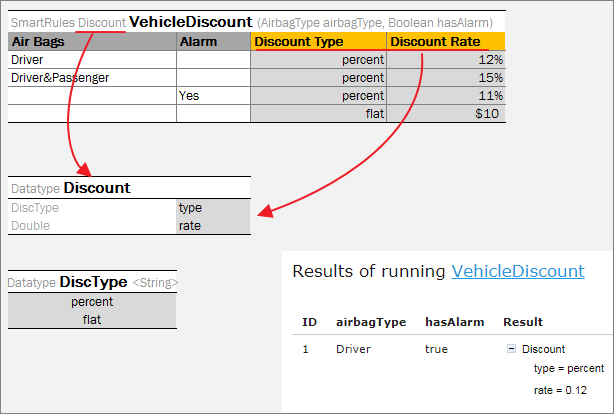
Smart rules table with compound return value
Note: To ensure the system matches the return column with an appropriate return object field, the user can “hover” over the column title and see the hint with this information in OpenL Studio.
Note: Return object fields are automatically filled in with input values if the return field name and input field name are matched.
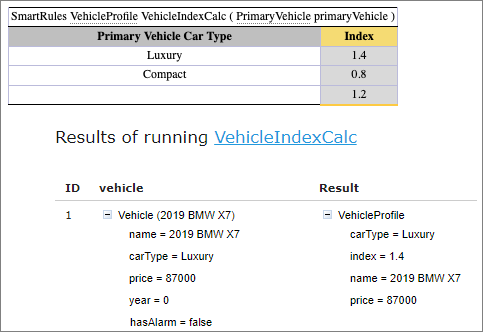
Return object fields automatically filled in with input values
If the rule returns the result of a very complex object (with nested objects inside), then there are several options for creating column titles:
- titles in one row with names that can be matched to the object fields unambiguously (the previously described approach) as shown in the example below, rule VehicleDiscount1;
- titles in several rows to define the hierarchy (structure) of the return object; in this case the user can merge cells associated with fields of a nested object as shown on the example below, rule VehicleDiscount2. Using this option, merging condition titles is required.
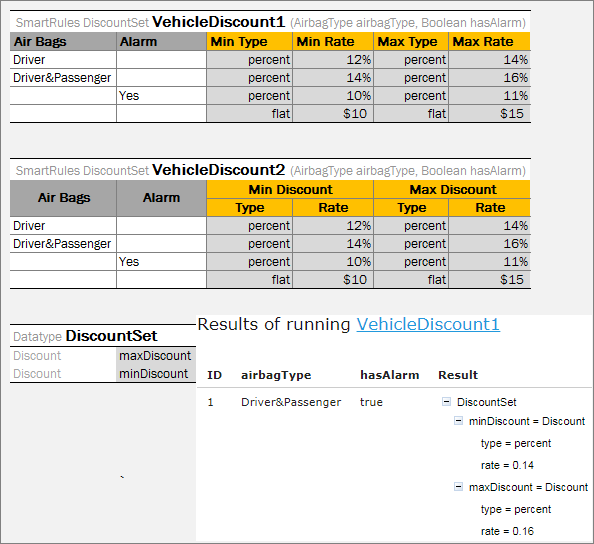
Smart rules tables with compound return value