Accessing Spreadsheet Result Cells
A value of the SpreadsheetResult type means that this is actually a table, or matrix, of values which can be of different types. A cell is defined by its table column and row. Therefore, a value of a particular spreadsheet cell can be accessed by cell’s column and row names as follows:
<spreadsheet result variable>.$<column name>$<row name>
or
$<column name>$<row name>(<spreadsheet result variable>)
If a spreadsheet has one column only, besides the column holding step names, spreadsheet cells can be referenced by row names. If there is one row and multiple columns, a cell can be referenced by the column name.
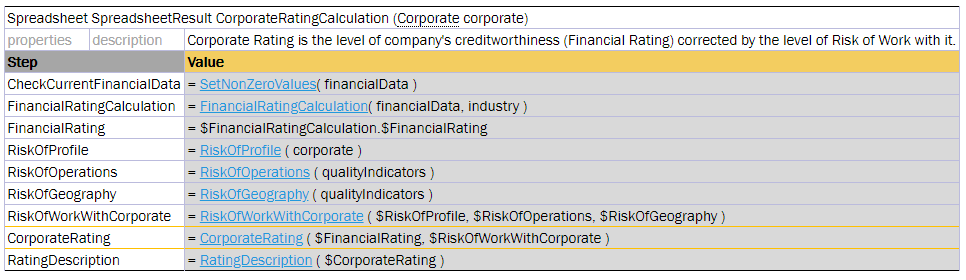
Referencing a cell by a row name
The same functionality is available in test tables as described in Testing Spreadsheet Result.
The spreadsheet cell can also be accessed using the getFieldValue(String <cell name>) function, for instance, (Double) $FinancialRatingCalculation.getFieldValue ("$Value$FinancialRating"). This is a more complicated option.
Note: If the cell name in columns or rows contains forbidden symbols, such as space or percentage, the cell cannot be accessed. For more information on symbols that are not allowed, see Java method documentation.