Using Calculations in Table Cells
OpenL Tablets can perform mathematical calculations involving method input parameters in table cells. For example, instead of returning a concrete number, a rule can return a result of a calculation involving one of the input parameters. The calculation result type must match the type of the cell. When editing tables in Excel files, start the text in the cells containing calculations with an apostrophe followed by =, and for the tables in OpenL Studio, start the text with =, without an apostrophe. Excel treats such values as a plain text.
The following decision table demonstrates calculations in table cells.
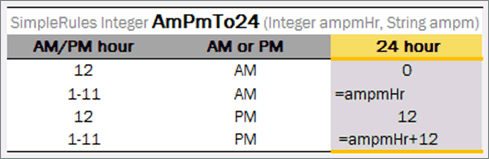
Decision table with calculations
The table transforms a twelve hour time format into a twenty four hour time format. The column RET1 contains two cells that perform calculations with the input parameter ampmHr.
Calculations use regular Java syntax, similar to the one used in conditions and actions.
Note: Excel formulas are not supported by OpenL Tablets. They are used as pre-calculated values.