Auto Type Discovery Usage
OpenL Tablets determines the cell data type automatically without its definition for a row or column. A user can turn on or off this behavior using the autotype property. If any row or column contains explicit data type definition, it supersedes automatically determined data type. The following example demonstrates that any data type can be correctly determined in auto mode. A user can put the mouse cursor over the “=” symbol to check the type of the cell value in OpenL Studio.
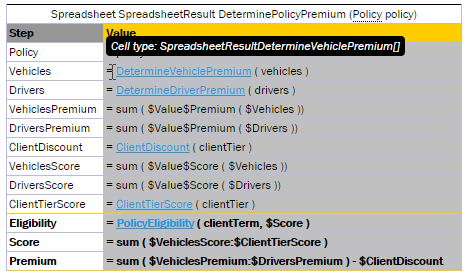
Auto Type Discovery Property Usage inside Spreadsheet table
The SpreadsheetResult cell type is automatically determined if a user refers to it from another table according to the following logic:
- Search for a cell with the same name is performed through all spreadsheets, and its type is set for the current cell.
- If several spreadsheets have cells with the same name but different types, the nearest common type is set for the current cell.
Recommendation: To ensure the system identifies types correctly, within the project, use data of the same type in the steps with the same name.
This logic also works when a user explicitly defines the type of the value as common SpreadsheetResult, for instance, in the following input parameter definition:

Defining the value type as SpreadsheetResult
However, there are several limitations of auto type discovering when the system cannot possibly determine the cell data type:
-
Type identification algorithm cannot correctly identify the cell type when a cell refers to another cell with the same name because of occurred circular dependencies.
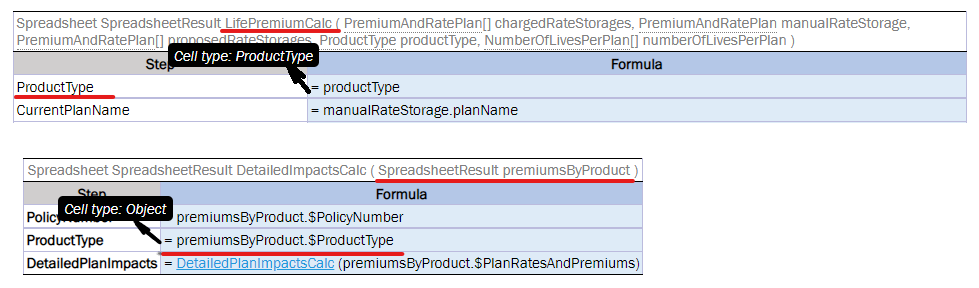
Limitation for referring to another cell with the same name
-
A user explicitly defines the return type of other Rules tables, such as Decision tables, as common SpreadsheetResult as follows:
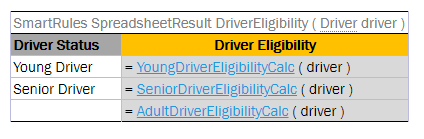
Explicitly defining the return type of other rules tables
The type of undefined cells must be explicitly defined as a custom spreadsheet result type or any other suitable type to avoid uncertain Object typing.
-
There is a circular dependency in a spreadsheet table calling the same spreadsheet rule itself in a cell. This cell type must be explicitly defined to allow correct auto type discovering of the whole spreadsheet table as follows:
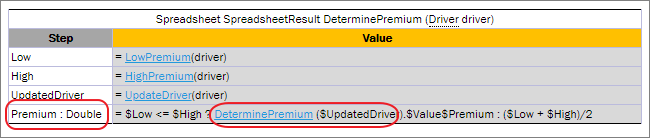
Defining a cell type explicitly