OpenL Tablets 5.12.0 Release Notes
Contents
OpenL Tablets 5.12.0 is a major feature release significantly enhancing multi-module project management, testing capabilities, and WebStudio usability. Eclipse plugins have been discontinued.
New Features
Multi-Module Project Dependencies
Dependencies management has been changed to provide a consistent experience across the rules management environment. Projects now support unified dependency handling where all modules within one project can reference rules in all other modules of that same project.
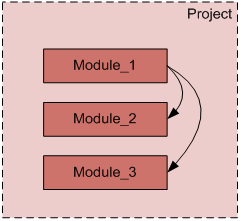
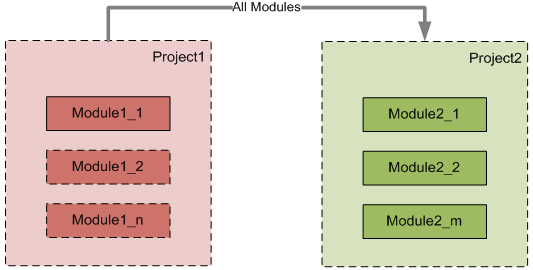
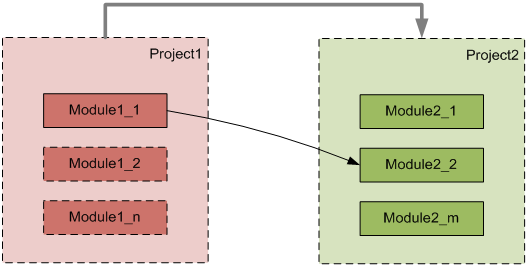
Single-Module and Multi-Module Viewing Modes in WebStudio
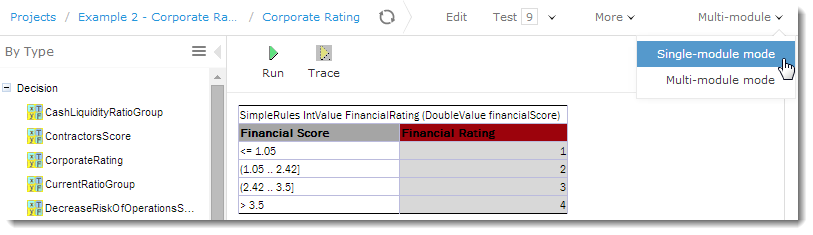
Two viewing modes support flexible dependency management:
- Single-module mode: Opens the module taking into account only module dependencies defined in the Environment table.
- Multi-module mode: Opens all modules of the current project with all their dependencies.
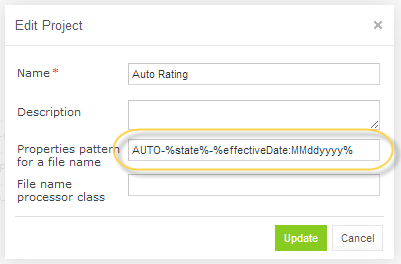
Properties from File Name
Table properties can be configured at module level through file naming patterns, enabling business users to define properties without creating separate Properties tables.
Enhanced Testing for Spreadsheet Results
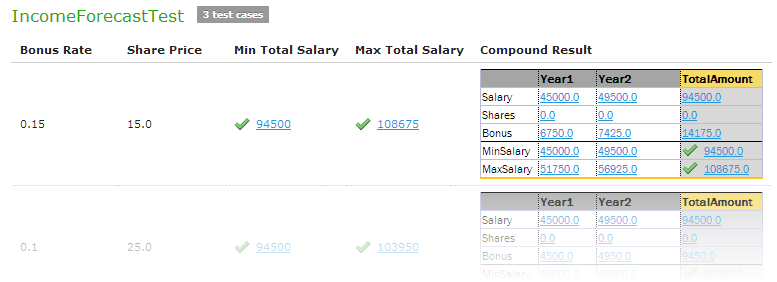
WebStudio provides the ability to test cells of a resulting Spreadsheet that contain values of complex types, including arrays of values, datatypes with multiple attributes, and nested Spreadsheets.
A Compound Result setting lets users display full test results or only tested values.
Improvements
Core:
- All rule calls are dispatched transparently between dependent modules.
- Access to
SpreadsheetResultcells enabled via column and row names with explicit datatype:(MyDatatype) spreadsheet.$ColumnName$RowName.
WebStudio:
- WebStudio links to projects, modules, and rule tables are now bookmarkable.
- Project and Module Pages for viewing and editing configuration details.
- Breadcrumb navigation.
- Header redesign.
- User Settings page for individual project, table, and testing preferences.
- Auto-addition of new modules via Repository uploads.
- Project name auto-population from descriptors or ZIP filenames.
- Multi-threaded test execution with parallel test case configuration.
- Isolated projects restricting access to project rules and dependencies.
- Comment capability when saving projects.
- Auto-adjusting table widths.
- Context variable columns in test results.
- Auto-scrolling to hidden table entries.
- Empty value displayed as “Empty” label.
- Synchronized page part opening.
- Memory usage and Repository page performance optimization.
Web Services:
- Compilation thread limitation and configuration.
Demo Package:
- Enhanced UI in the Web Services Example Client.
- Updated WebStudio repository tutorials.
Default Settings Changed:
- Rules display mode set to “By Type” by default.
- Table properties update setting turned off by default.
- Multi-module mode enabled by default.
Infrastructure:
- Maven Plugin introduced for generating interfaces, validating, and testing rules.
Bug Fixes
- Fixed: Deleting and closing projects containing JAR files.
- Fixed: Adding properties to large tables via WebStudio.
- Fixed: Using Data tables from dependency modules.
- Fixed: Table Part functionality in Data tables.
- Fixed: Test table transposition.
- Fixed: Explanation functionality from dependency modules.
- Fixed: Maximum cell styles excess.
- Fixed: Empty value handling in Data tables.
- Fixed: Collection validation in Data tables.
- Fixed: Testing separate array elements.
- Fixed: Result calculation and display without rounding.
- Fixed: Dependency functionality in Web Services.
Deprecations
| Deprecated Item | Notes |
|---|---|
| Eclipse plugins | Discontinued and deleted — use the OpenL Maven Plugin instead |
id tag in rules.xml |
Deprecated |
| WebStudio Repository dependencies | Replaced by Project dependencies via the Project page in the Rules Editor |
| Rules Configuration tab | Replaced by the Project page in the Rules Editor |
| Common repository | Removed |